
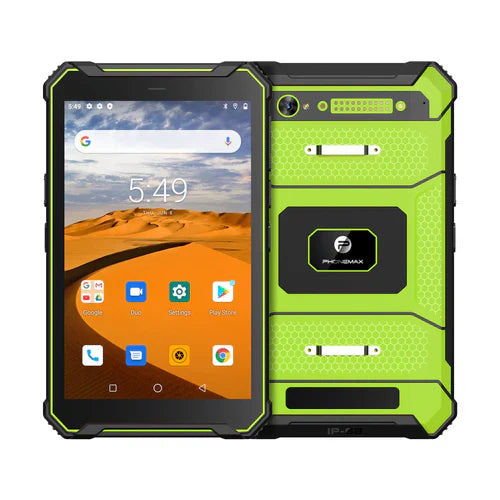
A 10.1-inch rugged vehicle tablet provides a larger interface for navigation, dispatch, fleet applications, forklift terminals and mobile operations. Because it is used in a moving platform, selection should include mounting, vibration, vehicle power and antenna performance as well as ordinary tablet specifications.
Display visibility inside vehicles
Sunlight through windows can create intense glare. Evaluate brightness, reflections, viewing angle and the actual mounting position. A high-brightness display can help, but sustained performance and thermal behavior matter during long shifts.
Mounting and vibration
The mount, dock and tablet should be treated as one mechanical system. Check locking method, cable routing, viewing angle and vibration resistance. Forklifts, trucks and construction vehicles can expose hardware to repeated vibration that differs from a simple handheld drop.
Vehicle power and charging
Confirm how the tablet receives power in the vehicle and whether a dock, USB-C or protected DC solution is required. Electrical requirements vary by model and installation. An internal battery can bridge temporary power loss and support handheld work away from the mount.
GNSS and wireless connectivity
Navigation and dispatch applications depend on reliable positioning and data. Verify GNSS capabilities, cellular bands, Wi-Fi and Bluetooth for the exact configuration. Vehicle structure and mounting position can affect antenna performance, so field testing is recommended.
Rugged requirements
Check ingress protection, temperature range, connector sealing and shock or vibration requirements for the intended vehicle. A device described as rugged is not automatically validated for every fleet environment.
Touch and operator usability
Drivers and machine operators may wear gloves, work in changing light or interact with the device while the vehicle vibrates. Test touch modes, button placement and application interface size under real operating conditions.
Fleet software
Confirm Android version, kiosk mode, MDM compatibility, remote updates and security policies. For large fleets, centralized management can be as important as hardware performance.
Vehicle tablet checklist
- Test the screen from the actual mounting angle.
- Validate the mount and dock under expected vibration.
- Confirm the vehicle charging architecture.
- Check GNSS and cellular performance in the installed position.
- Verify temperature and ingress requirements.
- Test gloves and operator interaction.
- Confirm remote device-management needs.
Browse rugged-device options or contact Phonemax for a fleet or vehicle deployment.

Jätä kommentti
Kaikki kommentit moderoidaan ennen julkaisemista.
Tämä sivu on suojattu hCaptcha-tunnistuksella, ja hCaptchan tietosuojakäytäntöjä ja käyttöehtoja sovelletaan.