

A vehicle-mounted rugged tablet can face a much wider thermal environment than a handheld device used indoors. A fleet project may specify a range such as -20°C to 60°C, but that range should be treated as a project requirement to validate, not as proof that every tablet carrying a similar headline is certified for those limits.
This guide shows how to define and test a wide-temperature rugged vehicle tablet for OEM or ODM projects. The goal is to connect the temperature target with vehicle power, mounting, sunlight exposure, battery behavior, connectivity and software rather than selecting a device from one number alone.
1. Separate ambient temperature from device temperature
A parked vehicle in direct sun can heat the tablet enclosure above the measured cabin-air temperature, while a winter vehicle can expose the unit to long cold-soak periods before power is available. Define where the tablet is installed, whether it is behind glass, how much direct solar load it receives and whether HVAC airflow reaches it.
For a range such as -20°C to 60°C, ask the supplier to state the test method, soak time, operating workload and whether the quoted values are operating or storage limits.
2. Define cold start and hot restart behavior
Some fleets need the tablet to boot immediately after a vehicle has been parked overnight. Others keep a low-power circuit active. These are different requirements. At the hot end, verify whether the device throttles, reduces display brightness, pauses charging or shuts down to protect the battery.
Specify acceptable startup time, application launch behavior and recovery after thermal protection events.
3. Vehicle power is part of thermal reliability
A vehicle tablet must tolerate more than nominal 12V or 24V power. The project may need protection from crank voltage drops, load dumps, transients, reverse polarity and noisy electrical systems. The power adapter, dock and charging strategy should be tested together with the tablet.
At low temperature, charging limits can become the bottleneck. At high temperature, charging can add heat to an already warm enclosure. Ask how the system controls charge rate and protects the battery at both ends of the target range.
4. Mounting affects temperature, vibration and usability
Mount location changes the device environment. A dashboard mount may receive heavy solar load and vibration; a forklift mount may experience continuous shock; an enclosed cab may trap heat around the rear housing. Evaluate the complete mount, connector strain relief, viewing angle and airflow rather than the tablet alone.
5. Display requirements should be tested under sun and heat
Outdoor fleets often require a high-brightness or sunlight-readable display. Peak brightness is only one metric. Ask whether brightness can be sustained at high enclosure temperature, how reflections are controlled and how much power the display consumes. Touch performance should be checked with gloves, moisture and vibration if those conditions occur in the fleet.
6. GNSS and cellular design should match the installation
Vehicle applications may depend on GNSS, LTE or 5G, Wi-Fi, Bluetooth and external peripherals. Confirm regional cellular bands and test positioning with the tablet in its real mount. Metal vehicle structures, heated windscreens, cases and docks can change antenna performance.
If the project requires external antennas, CAN interfaces, serial ports, barcode scanners, NFC or other peripherals, include them in the prototype and thermal test plan.
7. Distinguish operating range, storage range and certification
A supplier may quote a wide storage range while the operating range is narrower. It may also provide component-level data rather than a complete-device test. For procurement, request documentation that identifies the model, hardware revision, test standard, environmental chamber profile, duration and pass criteria.
The same principle applies to IP ratings, drop tests and vibration: confirm that the evidence belongs to the configuration being purchased.
8. OEM and ODM specification priorities
For a vehicle-tablet project, the OEM/ODM brief should describe the application before listing hardware. Include vehicle type, region, mount position, temperature target, operating hours, display conditions, power source, connectivity, peripherals and software-management requirements.
- Target operating, storage and charging temperature ranges
- Required cold-soak startup behavior
- Expected solar load and display-brightness requirement
- 12V/24V power, transient protection and ignition behavior
- Mount and vibration requirements
- GNSS and regional cellular bands
- Wi-Fi, Bluetooth, NFC and peripheral interfaces
- Battery or backup-power expectations
- Android version, kiosk mode, MDM and update policy
- Custom enclosure, logo, software or accessory scope
9. Prototype before committing to volume
Use engineering samples to run a defined acceptance plan. A useful vehicle test can include cold soak, hot soak, cold boot, sustained navigation, maximum required display brightness, cellular data, vehicle charging, vibration, ignition cycling and repeated temperature transitions.
If -20°C to 60°C is the project target, verify the full workload across that target instead of assuming the range from a marketing title.
Vehicle tablet acceptance checklist
- Are operating, storage and charging limits separately documented?
- Can the device start after the required cold soak?
- What happens to charging and display brightness at thermal limits?
- Has the power system been tested for vehicle transients?
- Is the mount validated for shock and vibration?
- Does GNSS work in the installed position?
- Are cellular bands correct for every deployment country?
- Are software updates and remote management defined?
- Does the supplier provide test evidence for the exact hardware revision?
FAQ
Does -20°C to 60°C automatically mean a vehicle tablet is certified for that range?
No. Treat the range as a requirement until the supplier provides complete-device evidence for the exact configuration and test conditions.
Why can a tablet overheat when cabin air is below 60°C?
Direct sun, a high-brightness display, charging and processor load can raise internal and surface temperatures above ambient air.
Should a vehicle tablet rely on its internal battery?
That depends on the workflow. Many installations use vehicle power while the internal battery provides short backup operation. The charging strategy and thermal limits still need validation.
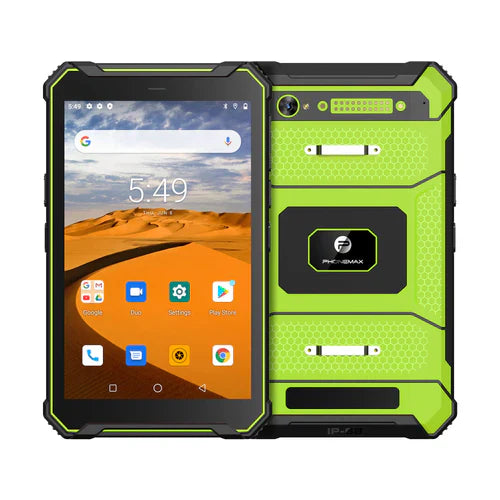
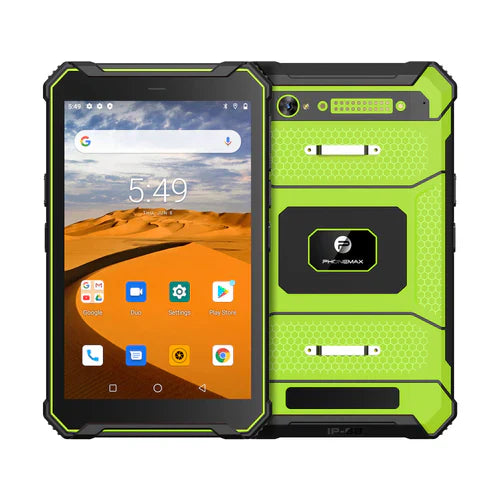
See Phonemax product options for current devices. For a vehicle-tablet OEM/ODM project, contact Phonemax with the target temperature range, vehicle power system, mount, regional bands and software requirements so the configuration and validation plan can be reviewed.

Leave a comment
All comments are moderated before being published.
This site is protected by hCaptcha and the hCaptcha Privacy Policy and Terms of Service apply.