
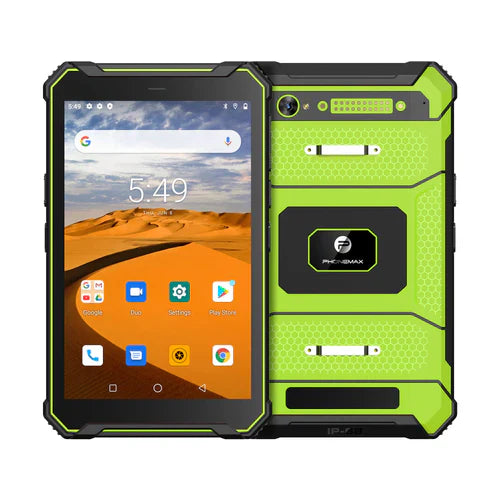
A 13MP rear camera can be a useful requirement for a rugged tablet used for field documentation, inspections, asset records, proof-of-work images or barcode and document capture. However, megapixel count alone does not determine image quality. Buyers should evaluate the complete camera system together with the tablet's ruggedness, display, software, battery and connectivity.
What does 13MP actually tell you?
Megapixels describe image resolution. A 13MP sensor can provide enough detail for many documentation tasks, but final results also depend on sensor size, lens quality, focus performance, image processing, lighting and application software. Two cameras with the same megapixel rating can produce noticeably different results.
Start with the imaging workflow
Define what workers need to capture. Equipment inspections may require readable labels and close-up damage photos. Construction teams may need wide scene documentation. Logistics users may photograph parcels, delivery evidence or documents. The correct camera requirement should reflect subject distance, lighting and the level of detail that must remain visible after the image is uploaded or compressed.
Autofocus and close-range detail
For serial numbers, labels and inspection details, reliable autofocus can matter more than megapixel count. Test how quickly the camera locks focus, how close it can focus and whether text remains readable at the normal working distance. If macro-like close-ups are important, validate them with representative samples.
Low-light and indoor performance
Warehouses, vehicles, maintenance spaces and evening field work can have limited light. Check noise, motion blur, focus reliability and flash or illumination behavior under the actual conditions. A 13MP specification does not guarantee strong low-light performance.
Document and barcode capture
A rear camera may be used for occasional barcode, QR-code or document capture through an Android application. Test the exact application and camera together. Dedicated barcode scanners can still be preferable when workers scan continuously, need longer range or require faster repeated reads.
Camera software and enterprise applications
Confirm that required Android applications can access the camera correctly and that features such as autofocus, image resolution, timestamping or file upload behave as expected. For managed fleets, also review Android version, security policy, kiosk mode and mobile-device-management compatibility.
Field durability around the camera
The camera module is part of the rugged enclosure. Check whether the lens area is recessed or protected from direct impacts and scratches. Verify the exact model's ingress rating, drop-test conditions and operating-temperature range separately. A 13MP camera specification says nothing about the tablet's rugged test level.
Display quality matters after capture
Workers often review images immediately on the tablet. Screen brightness, resolution, contrast and outdoor readability can affect whether they can confirm that a photo is sharp and complete before leaving the site. For outdoor inspections, test both camera capture and image review in daylight.
Battery and storage
Frequent photography, video preview, flash use, uploads and bright displays can increase power consumption. Estimate the number of images captured per shift and test runtime under the real workflow. Storage requirements depend on image resolution, video use, offline retention and how quickly files are synchronized to a server or cloud application.
Connectivity and location data
Field-documentation workflows may combine images with cellular data, Wi-Fi or GNSS. Confirm regional network bands and positioning requirements for the exact tablet. If an application records location with inspection photos, test the application's behavior and accuracy rather than assuming the camera itself provides location metadata.
13MP rugged-tablet evaluation checklist
- Define the subjects, distance and lighting conditions workers will photograph.
- Test autofocus and readable detail on labels, documents or inspection targets.
- Evaluate low-light performance if indoor or night work matters.
- Test required barcode, document or field-service applications.
- Verify rugged ratings and protection around the camera area.
- Check the display for reviewing images in the work environment.
- Measure battery runtime with realistic camera and upload activity.
- Confirm storage, cellular, Wi-Fi and GNSS requirements.
- Use a production-representative sample before fleet deployment.
FAQ
Is 13MP enough for a rugged tablet camera?
It can be sufficient for many inspection and documentation tasks, but image quality depends on the complete camera system and the workflow. Test the actual device rather than comparing megapixels alone.
Does a 13MP camera replace a dedicated barcode scanner?
Not always. Camera-based scanning can work well for occasional use, while dedicated scanners may be better for high-volume or specialized barcode workflows.
Should camera performance be tested outdoors?
Yes if the tablet will be used outdoors. Bright light, reflections, shadows and motion can affect both capture and image review.
Browse current rugged-device options or contact Phonemax with your field-imaging requirements.

Yorum yazın
Tüm yorumlar yayınlanmadan önce incelenir.
Bu site hCaptcha ile korunuyor. Ayrıca bu site için hCaptcha Gizlilik Politikası ve Hizmet Şartları geçerlidir.