

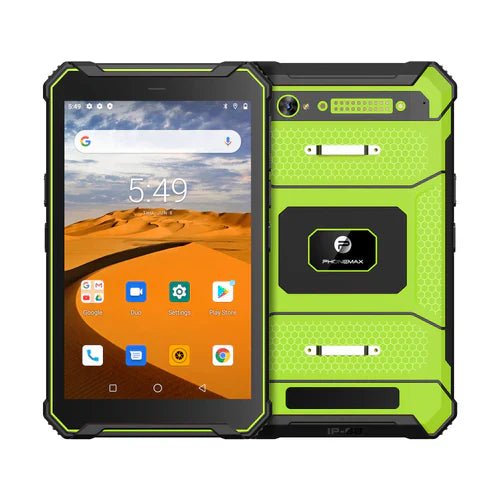
An 8-inch rugged vehicle tablet is designed for workflows where a device must remain usable in moving vehicles, forklifts or other mobile equipment while still being compact enough for handheld use. Selecting one requires attention to outdoor display performance, mounting, vibration, vehicle power, positioning, wireless connectivity and fleet software.
Why 8 inches works well in vehicles
An 8-inch screen can provide enough area for navigation, dispatch, warehouse or field applications without occupying as much dashboard or cab space as a larger tablet. The smaller size can also make it easier to remove the device from a mount for inspections, proof of delivery or other handheld tasks.
Sunlight readability and the 1000-nit class
Vehicle tablets are often exposed to direct sunlight through a windshield or used outdoors. High-brightness displays—including configurations marketed around the 1000-nit class—can improve visibility, but the headline number should be evaluated together with reflections, contrast, viewing angle and thermal behavior.
A very bright screen also consumes more power and can generate more heat. Ask whether the specified brightness is peak or sustained and test the actual device in the intended mounting position. Do not assume every product carrying a “sunlight-readable” description has the same measured brightness.
Mounting and mechanical stability
A vehicle installation should keep the tablet readable and reachable without interfering with driving or machine operation. Review mounting pattern, dock design, locking mechanism, cable routing and the ability to withstand repeated vibration. The mount and tablet should be evaluated as a system.
For forklifts, trucks and industrial vehicles, vibration and shock can be more important than a simple handheld drop specification. Verify the test conditions relevant to the deployment.
Vehicle power and charging
Continuous vehicle use may require more than a consumer charging cable. Depending on the deployment, consider dock charging, protected DC input, USB-C power, ignition-linked behavior and how the device handles temporary power interruption. Exact electrical input requirements vary by model and should be verified before installation.
An internal battery remains useful even for mounted units because it can bridge short power interruptions and allow workers to remove the tablet from the vehicle.
GNSS and navigation
For fleet, logistics or mapping applications, confirm the positioning hardware and supported satellite systems of the exact tablet. Antenna placement, vehicle structure and mounting position can influence reception. If high positioning accuracy is important, test the device in the actual vehicle and workflow.
Cellular, Wi-Fi and Bluetooth
Vehicle tablets often act as permanently connected work terminals. Confirm cellular bands for the destination carrier, Wi-Fi performance in depots or warehouses, Bluetooth compatibility with peripherals and any requirements for external antennas. For international fleets, radio compatibility should be validated country by country.
Touchscreen operation in a cab
Drivers and industrial operators may wear gloves or interact with the screen while the vehicle vibrates. Larger interface targets, suitable touch sensitivity and physical or programmable buttons can improve usability. If wet-touch or glove modes are required, test them rather than assuming they are included on every rugged tablet.
Rugged and environmental specifications
Check the actual model's ingress rating, drop specification, operating-temperature range and connector protection. Vehicle use may involve dust, temperature swings, vibration and repeated docking cycles. A rugged enclosure does not automatically guarantee suitability for every vehicle environment.
Fleet software and device management
Hardware is only one part of fleet deployment. Confirm Android version, required applications, kiosk behavior, mobile-device-management compatibility, remote update requirements and security policy. For large fleets, the ability to configure and support devices remotely can reduce operating cost significantly.
Common applications
- Delivery and route navigation
- Fleet dispatch and proof of delivery
- Forklift and warehouse terminals
- Construction and utility vehicles
- Field-service vehicles
- Asset tracking and mobile inspection
Vehicle tablet buying checklist
- Is the display readable from the real mounting angle in daylight?
- If a 1000-nit-class display is required, is sustained brightness documented?
- Is the mount secure under expected vibration and shock?
- Does the power solution match the vehicle electrical system?
- Are GNSS and cellular bands suitable for the deployment area?
- Can workers use the touchscreen with their normal gloves?
- Are IP, drop and temperature specifications appropriate for the environment?
- Does the Android/software lifecycle fit the planned fleet lifetime?
FAQ
Does a 1000-nit display guarantee good sunlight readability?
No. It can help substantially, but reflections, contrast, viewing angle and sustained thermal performance also matter.
Can any rugged tablet be mounted in a vehicle?
Not necessarily. Mounting interfaces, vibration resistance, charging and operating temperature should all be checked for the intended installation.
Is a vehicle dock necessary?
It depends on the workflow. A dock can simplify charging, secure mounting and repeated removal, but the required setup varies by fleet.
Review current rugged-device options or contact Phonemax to discuss a vehicle or fleet deployment.

Leave a comment
All comments are moderated before being published.
This site is protected by hCaptcha and the hCaptcha Privacy Policy and Terms of Service apply.