
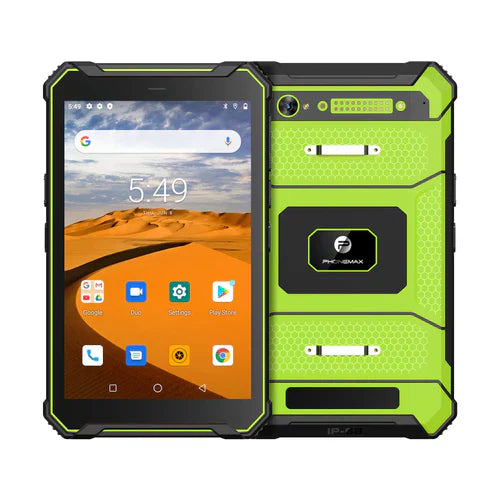
64GB can be a practical storage target for some rugged-tablet deployments, but the number alone does not tell you how much space users will actually have or whether the device will remain usable over a multi-year field lifecycle. Storage should be sized from the workflow, Android system footprint, app data, offline files, photos, maps and update requirements.
This guide treats 64GB as a configuration target, not as a claim that every Phonemax rugged tablet ships with that capacity. Confirm the exact model and storage option before ordering.
1. Start with usable storage, not advertised capacity
A device sold with 64GB of internal storage will not expose the full nominal amount to the user. Android, recovery partitions, preinstalled apps and system-reserved space consume part of it. Ask how much free space is available on a clean production unit after the final software image is installed.
2. Estimate the real field workload
Different jobs consume storage at very different rates. A simple warehouse app may use little local space, while inspections with photos and video, offline GIS maps, service manuals or cached databases can grow quickly.
- Apps and updates: include current app size plus future versions and Android updates.
- Photos and video: estimate daily capture volume, retention period and upload frequency.
- Offline maps: regional map packages can become one of the largest local datasets.
- Documents: manuals, drawings, PDFs and work orders should be included in the budget.
- Database/cache: enterprise apps can retain significant offline records.
- Safety margin: avoid designing a fleet to operate permanently near full capacity.
3. When 64GB can be enough
A 64GB target can suit controlled deployments where the tablet runs a limited set of applications, synchronizes data regularly and does not retain large media libraries. It can also work for kiosk-style or warehouse use when administrators control which applications and files are installed.
For larger offline map sets, long photo-retention periods, video evidence or many enterprise apps, 128GB or more may provide a better lifecycle margin.
4. Internal storage and RAM are different
Storage capacity and memory are often confused. Internal storage holds Android, apps and files. RAM affects how many processes can remain active and how smoothly applications multitask. A project that needs 64GB of storage may still require a different RAM configuration depending on software load.
5. Check storage performance as well as capacity
Two devices with the same nominal capacity can feel different if storage speed, controller performance or software optimization differs. For workflows involving databases, image capture or large map packages, test app launch, file writes, data import and update installation on production-equivalent hardware.
6. Plan for removable or expandable storage carefully
If a model supports removable storage, confirm the maximum supported card size, file system, application restrictions and whether enterprise security policy allows removable media. Expansion can be useful for media or offline datasets, but it should not automatically be treated as equivalent to fast internal storage.
7. Security and device management affect storage
Enterprise deployments may require encryption, work profiles, MDM agents, local logs or secure containers. These features consume space and can change how files are accessed. Include them in the storage test image rather than testing a clean consumer configuration.
8. Ruggedness still needs separate verification
A 64GB headline says nothing about ingress protection, drop resistance, operating temperature or display usability. Check rugged test evidence separately for the exact configuration being purchased. Storage selection should be one part of a complete evaluation covering battery, display, radios, GNSS, software and accessories.
9. Buying checklist for a 64GB rugged tablet
- How much usable space remains after the final Android image?
- How large are the required apps, maps and local databases?
- How much photo or video data is created per shift?
- How long must data stay on the device before upload or deletion?
- Is removable storage supported and permitted by security policy?
- What RAM configuration is paired with the storage option?
- How much space should remain free for updates and healthy operation?
- Are the quoted rugged ratings verified for the same hardware configuration?
Example storage budget
For a field inspection program, create a simple budget before procurement: operating system and required software, offline maps, expected media per day, local record retention and a safety reserve. Run the actual application image on a sample unit for several weeks and measure growth instead of relying only on theoretical file sizes.
FAQ
Is 64GB enough for a rugged Android tablet?
It can be, especially for controlled applications with frequent synchronization. Data-heavy workflows may need more capacity.
Does 64GB mean 64GB is available to the user?
No. System partitions, Android and preinstalled software use part of the nominal capacity.
Should I choose 64GB or 128GB?
Choose from the projected lifecycle workload. If offline maps, photos, video or application growth are significant, the larger capacity can provide useful margin.
For current device configurations, see Phonemax products. For a project with a defined storage, RAM, software or ruggedness requirement, contact Phonemax so the available configuration can be checked.

Commenta
Nota che i commenti devono essere approvati prima di essere pubblicati.
Questo sito è protetto da hCaptcha e applica le Norme sulla privacy e i Termini di servizio di hCaptcha.