
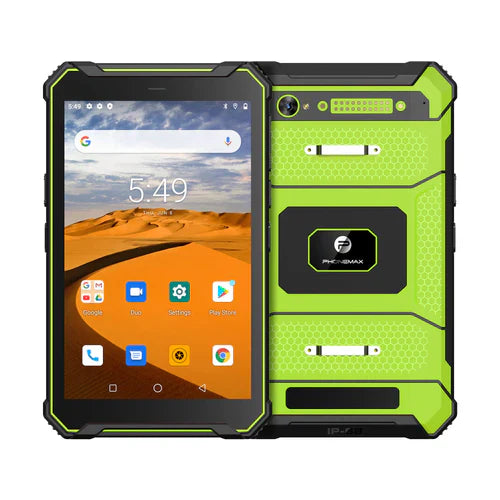
802.11ac (Wi-Fi 5) remains a practical connectivity standard for many industrial rugged-tablet deployments. The important question is not whether a tablet simply lists “802.11ac,” but whether its radio, antenna design, access-point environment, security settings, roaming behavior, and field workflow work together reliably.
This guide explains what 802.11ac means for rugged tablets used in warehouses, field service, logistics, construction, utilities, inspections, and other mobile industrial workflows. It is a selection and deployment guide rather than a specification sheet for one particular Phonemax model; always verify the exact wireless bands, certifications, rugged ratings, and regional radio support on the product page or project datasheet.
What does 802.11ac mean on a rugged tablet?
IEEE 802.11ac is commonly marketed as Wi-Fi 5. It was designed to increase wireless throughput compared with earlier Wi-Fi generations, especially on the 5 GHz band. In real industrial use, however, headline link speed is only one part of the experience. Effective performance depends on channel width, signal strength, interference, access-point configuration, client antenna design, network congestion, distance, obstacles, and the application itself.
For a rugged tablet, that distinction matters. A warehouse-scanning application may need stable roaming and low packet loss more than maximum benchmark speed. A field technician downloading drawings may care more about fast file transfers. A vehicle-mounted tablet may move rapidly between access points. Therefore, the right way to evaluate 802.11ac is by workflow, not by the Wi-Fi label alone.
802.11ac versus 2.4 GHz Wi-Fi in industrial environments
| Factor | 5 GHz / 802.11ac use | 2.4 GHz use |
|---|---|---|
| Typical advantage | Higher capacity and more channel options | Longer reach and better penetration through some obstacles |
| Common challenge | Shorter practical range through walls, racks, or dense structures | More congestion from legacy Wi-Fi, Bluetooth, and other 2.4 GHz devices |
| Good fit | High-density warehouses, file-heavy workflows, modern managed WLANs | Coverage-sensitive areas or legacy infrastructure |
| Deployment priority | Access-point density, channel planning, roaming | Interference control and capacity planning |
A dual-band rugged tablet can be useful because the network can be designed around both coverage and capacity. “Dual-band” should still be verified for the exact device configuration, because regional variants and hardware revisions can differ.
Why Wi-Fi reliability matters more on a rugged tablet
Industrial tablets are often used farther from a desk and closer to the operational edge. A connection drop can interrupt a barcode transaction, cloud form, work-order update, map synchronization, voice session, inventory lookup, or remote-support session. This makes radio stability part of productivity.
When evaluating an industrial tablet, consider the complete connectivity path:
- Client radio: supported Wi-Fi generations, bands, channel widths, and security modes.
- Antenna implementation: placement and device orientation can influence real-world signal quality.
- Access-point layout: metal shelving, reinforced concrete, machinery, vehicles, and outdoor structures change RF behavior.
- Roaming: workers and vehicles may move between coverage cells throughout a shift.
- Application tolerance: some apps recover gracefully from brief interruptions; others require near-continuous connectivity.
- Device management: enterprise deployments benefit from consistent Wi-Fi profiles, certificates, update policies, and troubleshooting data.
Warehouse and logistics use
Warehouses are a demanding RF environment because steel racks, dense inventory, moving forklifts, handheld scanners, cameras, and many concurrent clients can change signal conditions. A rugged tablet with 802.11ac can be a good fit, but deployment should be validated in the actual facility rather than assumed from a laboratory speed rating.
For warehouse projects, test the routes workers really use: receiving docks, high-rack aisles, packing areas, cold rooms, loading zones, and vehicle lanes. Record roaming behavior and application response, not only a speed-test result. If the workflow includes barcode scanning or inventory transactions, measure transaction completion and reconnection time as well.
Field service, construction, and utilities
In field work, Wi-Fi may alternate with cellular connectivity or offline operation. 802.11ac is useful when technicians return to a depot, connect to a local hotspot, access a site WLAN, or synchronize large files. The device should also support an offline-first workflow when connectivity is unavailable.
For construction and utilities, do not treat “rugged” and “Wi-Fi” as the same requirement. Environmental protection, drop resistance, operating temperature, glove use, display readability, battery strategy, GNSS, cellular bands, and Wi-Fi capability are separate specifications. Verify each one independently for the exact deployment.
How to evaluate an 802.11ac rugged tablet before deployment
- Confirm the exact radio specification. Check whether the specific SKU supports the Wi-Fi bands and regional requirements you need.
- Check your WLAN generation. Wi-Fi 5 clients can operate in many modern networks, but access-point configuration and backward compatibility policies matter.
- Test real roaming routes. Walk or drive the same paths the device will follow in normal work.
- Measure application performance. Test the actual ERP, WMS, inspection, mapping, dispatch, or remote-support software.
- Validate security. Confirm the authentication and encryption method required by your organization and whether certificate-based deployment is needed.
- Test with accessories installed. Vehicle docks, hand straps, cases, mounts, and device orientation can change how a tablet is held and where it operates.
- Plan for offline operation. Critical workflows should define what happens when the network is temporarily unavailable.
- Review lifecycle needs. Consider OS support, device management, spare units, charging, accessories, and replacement planning alongside Wi-Fi performance.
802.11ac, Wi-Fi 6, and when an upgrade matters
Wi-Fi 6 can provide efficiency improvements in dense environments, but that does not automatically make every Wi-Fi 5 rugged tablet unsuitable. An existing 802.11ac device may still be appropriate when the application bandwidth is moderate, the WLAN is well designed, client density is manageable, and the device meets the rest of the operational requirements.
An upgrade becomes more important when a site has very high client density, is refreshing access points, needs newer security or management capabilities, transfers large data sets frequently, or has a long deployment horizon. The decision should be based on the entire fleet and network roadmap rather than a single specification line.
Common mistakes when buying an industrial Wi-Fi tablet
- Choosing by theoretical Wi-Fi speed without testing the actual site.
- Assuming every device sold under one model name has identical regional radio support.
- Ignoring access-point placement and blaming the client for coverage gaps.
- Using consumer-office test conditions to predict warehouse or vehicle performance.
- Assuming an IP or MIL-STD claim guarantees wireless performance; these are separate characteristics.
- Deploying a cloud-only application without defining an offline or reconnection workflow.
Deployment checklist
| Check | Question to answer |
|---|---|
| Wi-Fi standard | Does the exact SKU support the WLAN features required by the project? |
| Band plan | Will the deployment use 5 GHz, 2.4 GHz, or both? |
| Roaming | Does the application remain usable while moving between access points? |
| Security | Can the device use the organization’s authentication and certificate policy? |
| RF environment | Have metal racks, machinery, walls, vehicles, and outdoor areas been tested? |
| Application | Have real transactions and file transfers been tested, not just a speed test? |
| Fallback | What happens when Wi-Fi is unavailable? |
| Rugged requirements | Are ingress, drop, temperature, display, battery, and accessory requirements separately verified? |
FAQ
Is 802.11ac the same as Wi-Fi 5?
Yes. 802.11ac is the IEEE wireless LAN generation commonly branded as Wi-Fi 5.
Does 802.11ac guarantee faster industrial performance?
No. It provides a capable wireless foundation, but real throughput and reliability depend on the tablet implementation, access points, RF conditions, network design, and application behavior.
Is 5 GHz always better than 2.4 GHz?
No. 5 GHz often offers more capacity and less legacy congestion, while 2.4 GHz can provide greater practical reach in some environments. Many projects benefit from a planned dual-band strategy.
Should a new rugged-tablet project choose Wi-Fi 6 instead?
Not automatically. Wi-Fi 6 is valuable for many new deployments, but Wi-Fi 5 can still be sufficient for stable, moderate-bandwidth industrial workflows. Compare network roadmap, client density, security, lifecycle, and application needs.
Bottom line
An 802.11ac rugged tablet should be selected as part of a complete industrial connectivity system. Treat Wi-Fi 5 support as the starting point, then validate radio coverage, roaming, security, application behavior, offline fallback, rugged specifications, and lifecycle requirements in the real operating environment.

Editorial note: This guide explains general wireless-network selection principles. Product specifications and wireless certifications can vary by model, SKU, market, and hardware revision. Confirm current project requirements with the exact Phonemax product documentation before procurement or deployment.


Lämna en kommentar
Alla kommentarer modereras innan de publiceras.
Denna webbplats är skyddad av hCaptcha och hCaptchas integritetspolicy . Användarvillkor gäller.