
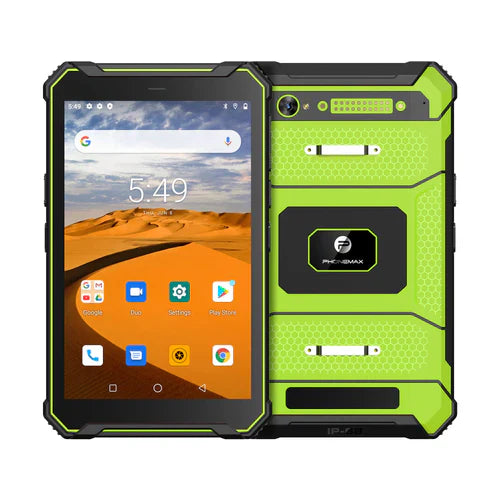
For an industrial rugged tablet, the words Corning Gorilla Glass describe one part of the display stack: the protective cover glass. They do not, by themselves, prove that the complete tablet is waterproof, drop-proof, sunlight-readable or suitable for a particular field environment. A reliable buying decision therefore separates the cover-glass specification from the performance of the finished device.
This guide explains how to evaluate Gorilla Glass, scratch resistance, drop protection, anti-glare requirements, touch performance and the rest of the rugged-tablet display system before purchasing or approving an OEM/ODM build.
What Gorilla Glass tells you—and what it does not
Corning describes Gorilla Glass as a strengthened cover-glass family designed to improve resistance to damage. Different generations are engineered and tested differently. For example, Corning publishes separate laboratory performance information for Gorilla Glass 3 and Gorilla Glass 5.
Those material-level tests are useful evidence about the glass family, but they are not a substitute for testing the completed tablet. The final result also depends on glass thickness, edge design, lamination, frame support, adhesive, display module, protective film, enclosure geometry and the surface onto which a device is dropped.
Do not assume the Gorilla Glass generation
Older product pages often use phrases such as “Gorilla Glass 3,” “Gorilla Glass 5” or simply “Gorilla Glass” as though they were interchangeable. They are not. If a specific generation matters to your procurement requirement, ask for documentation tied to the exact production SKU or bill of materials. Do not infer the generation from a generic product family description, a photograph or a supplier template.
Scratch resistance is different from drop resistance
A display can perform well against everyday scratching yet still fail during an edge impact, and a tablet can survive a housing drop while its cover glass is damaged. Evaluate these as separate questions:
- Scratch resistance: how the cover surface resists abrasion and damage from contact with hard particles or tools.
- Glass impact performance: how the cover glass behaves when impact energy reaches the display area or edge.
- Whole-device drop performance: how the enclosure, corners, frame, glass, battery, connectors and internal components survive a specified drop procedure.
- Ingress protection: resistance to dust and water under a defined test method; this is separate from glass toughness.
Evaluate the complete display stack
For industrial use, ask how the display is constructed rather than checking only the cover-glass brand. Relevant layers can include the cover glass, optical adhesive, touch sensor, LCD or OLED panel, anti-reflective or anti-fingerprint treatments and any replaceable protective film.
Full lamination can affect reflections, optical clarity and mechanical behavior. A replaceable film can help with field scratches but can also change glare and touch feel. The correct combination depends on the application.
Anti-glare and outdoor readability
“Gorilla Glass” does not automatically mean “anti-glare” or “sunlight-readable.” Outdoor readability depends on several variables, including panel luminance, reflectance, optical bonding, surface treatment, viewing angle and the user’s environment.
If the tablet will be used outdoors, in a vehicle cab or under bright industrial lighting, test a production-representative unit in the actual lighting conditions. Check both direct readability and reflections at common working angles. Also verify whether any anti-glare film or coating is part of the standard configuration or an optional accessory.
Glove, wet-touch and stylus requirements
Cover glass is only one part of touch performance. If workers use gloves, work in rain or need a stylus, confirm the touch-controller modes supported by the exact tablet. Test the gloves and stylus types that will actually be used. Thick work gloves, water on the screen and protective films can all change touch behavior.
Cleaning and chemical exposure
Factories, warehouses, medical environments and workshops may clean devices frequently. Do not assume that an IP rating or tough cover glass guarantees compatibility with every solvent or disinfectant. Ask for approved cleaning methods and material-compatibility information for the complete display assembly, coatings, seals and enclosure.
How to verify drop claims
When a supplier lists a drop height, request the test conditions. Useful details include the surface, number of drops, orientations, operating state, protective accessories, temperature and whether the tested unit matches the production configuration. A “1.2 m drop” statement without test context is much less useful than a documented procedure.
The same principle applies to references to MIL-STD testing: identify the exact method and conditions rather than treating the standard name as a universal certification.
Industrial deployment checklist
- Confirm the exact cover-glass brand and generation for the production SKU if this is a requirement.
- Separate scratch, glass-impact, whole-device drop and ingress claims.
- Ask whether the display is fully laminated and whether a protective film is fitted.
- Test glare and readability in the real working environment.
- Verify glove, wet-touch and stylus behavior with real accessories.
- Confirm approved cleaning agents and procedures.
- Review the documented drop-test conditions for the finished tablet.
- Check replacement-display and after-sales procedures for fleet deployments.
- For OEM/ODM projects, lock the display and cover-glass specification in the approved BOM or sample record.
Questions for OEM and ODM projects
Before approving a custom rugged tablet, ask which display module and cover glass are used in the sample, whether substitutions are allowed during mass production, and how any approved change will be documented. If Gorilla Glass branding is important to a tender or marketing claim, require evidence for the exact build rather than relying on a generic catalogue sentence.
It is also useful to validate the final unit after accessories are fitted. Vehicle mounts, screen protectors, gloves and cases can change how the user interacts with the display and how impact loads reach the enclosure.
FAQ
Does Gorilla Glass make a tablet fully rugged?
No. It is a cover-glass technology. Whole-device ruggedness depends on the entire mechanical and electrical design and on the test conditions used for the finished tablet.
Is Gorilla Glass 5 automatically better for every industrial tablet?
No single glass generation should be selected from its name alone. Match the exact material, device design and verified test results to the deployment requirement.
Does Gorilla Glass mean the screen is anti-glare?
No. Anti-glare behavior and outdoor readability depend on the complete display system and surface treatments.
Should an OEM buyer request proof of the glass version?
Yes, when the version is a procurement requirement. Tie the evidence to the exact sample, SKU or bill of materials.
Browse current Phonemax rugged-device options or contact Phonemax to discuss display, touch and durability requirements for an industrial tablet project.


Napsat komentář
Všechny komentáře jsou před zveřejněním moderovány.
Tento web je chráněn službou hCaptcha a vztahují se na něj Zásady ochrany osobních údajů a Podmínky služby společnosti hCaptcha.