
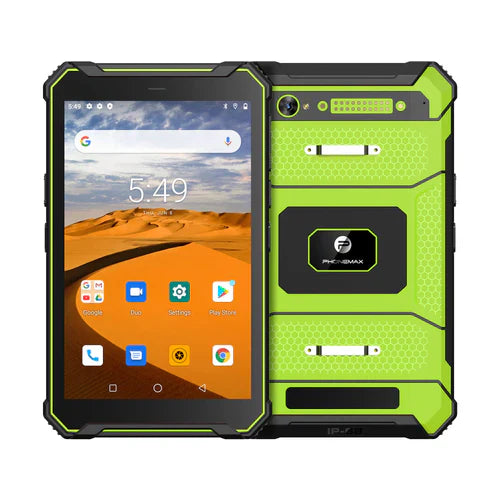
A low-temperature rugged tablet should be selected from verified test evidence, not from a temperature number in a headline. If a project calls for operation near -20°C, the first step is to define exactly what that requirement means: powered operation, storage, charging, startup after a cold soak, or continuous use while the device moves between cold and warm environments.
This guide explains how to turn a low-temperature requirement into a practical purchasing and validation plan for rugged tablets. The -20°C figure is treated here as a design or test target. It is not a claim that every Phonemax tablet is certified to operate at that temperature. Buyers should confirm the exact model, configuration and test report before deployment.
1. Define the temperature requirement correctly
Ask a supplier for separate operating, storage and charging temperature ranges. These limits are not interchangeable. A tablet may survive storage at a lower temperature than it can safely charge, and a device that remains powered during a gradual cooldown may behave differently from one that must boot after hours in a freezer or winter vehicle.
- Operating temperature: the range in which the complete device is expected to function.
- Storage temperature: the range the powered-off device can tolerate without damage.
- Charging temperature: the safe range for charging the battery.
- Cold-start requirement: whether the tablet must boot after a defined cold-soak period.
- Transition requirement: whether the unit repeatedly moves between cold outdoor air and warm indoor spaces.
2. Battery performance is usually the first constraint
Lithium battery output falls as temperature drops. Runtime can shorten, voltage can sag under load, and fast charging may need to be limited or disabled. For cold-storage, winter logistics, utilities or field-service projects, ask for battery test data at the actual workload: screen brightness, GNSS, cellular data, Wi-Fi, camera or scanner use and background applications.
Do not evaluate only nominal capacity. A larger battery can provide more energy reserve, but cell chemistry, power management, thermal design and software behavior matter just as much. If the device will be charged in a cold environment, confirm what protections prevent unsafe low-temperature charging.
3. Test the display and touch interface in real working conditions
Cold-temperature usability includes more than whether the LCD turns on. Check display response, brightness stability, touch latency and glove operation after the device has reached the target temperature. If operators work outside, add sunlight readability and anti-glare performance to the test plan. If they work in freezers, test with the gloves actually used on site.
4. Condensation can matter more than the headline temperature
Moving a cold tablet into warm humid air can create condensation on or inside the device. A rugged enclosure and an ingress-protection rating help, but they do not automatically prove resistance to every condensation cycle. Ask how seals, pressure equalization, ports, speakers, microphones and cameras are designed, and include repeated cold-to-warm transitions in the validation plan when the workflow requires them.
5. Verify complete-system durability
A temperature specification should be considered together with drop, vibration, ingress and connector durability. Plastics, adhesives, seals and cable jackets can behave differently when cold. For field and industrial programs, request the exact test standard, sample configuration, test duration and pass criteria rather than relying on terms such as rugged, industrial or ultra-low temperature.
6. Storage capacity and memory are configuration choices
Some projects require 128GB or more local storage for offline maps, photos, inspection records, manuals or cached databases. Treat storage as a separate configuration requirement rather than assuming that a low-temperature model automatically includes a particular capacity. Confirm usable storage, expansion options, file encryption, application footprint and the expected volume of locally retained data.
7. Check cellular, Wi-Fi and GNSS performance
For outdoor and mobile teams, the tablet is useful only if communications and positioning continue to work in the target environment. Confirm regional LTE or 5G bands, SIM configuration, Wi-Fi requirements, Bluetooth peripherals and GNSS support. Testing should include the actual antenna orientation, case, mount and vehicle or equipment installation when those can affect radio performance.
8. What to request from a rugged-tablet manufacturer
For OEM or ODM sourcing, ask for evidence tied to the exact hardware revision being quoted. A useful supplier package can include a temperature test report, battery and charging limits, ingress and drop reports, component change-control policy, software update plan and sample validation procedure.
- Exact operating, storage and charging ranges
- Cold-start and cold-soak test method
- Battery runtime at the target temperature
- Touch and display behavior with gloves
- Ingress, drop and vibration test evidence
- Available RAM and storage configurations
- Regional network-band support
- Android version, update policy and device-management options
- Accessory, dock, mount and charging options
- OEM/ODM scope, MOQ and engineering-change control
9. Build a project-specific validation matrix
A practical acceptance test should reproduce the real workflow. For example, a warehouse project may require an eight-hour cold-soak, barcode scanning with gloves, Wi-Fi roaming, repeated door-to-freezer transitions and charging only in a warm staging area. A utility project may instead emphasize cold starts, GNSS, cellular data, outdoor brightness and vehicle charging.
Record the environment, workload, test duration and pass/fail criteria before comparing devices. This prevents a single temperature number from becoming a substitute for engineering validation.
Low-temperature rugged tablet checklist
- Is the quoted temperature an operating, storage or charging limit?
- Was the complete tablet tested, or only an individual component?
- Can it cold-start after the required soak time?
- How much battery runtime remains at the target temperature?
- How does charging behave when the battery is cold?
- Does touch work with the required gloves?
- How is condensation handled during temperature transitions?
- Are IP, drop and vibration results available for the same configuration?
- Are storage, radio bands, software and accessories suitable for the deployment?
FAQ
Does a -20°C headline mean every rugged tablet can operate at -20°C?
No. The figure should be verified for the exact model and test condition. Operating, storage, charging and cold-start limits may differ.
Is 128GB storage necessary for low-temperature work?
Not because of temperature itself. It can be useful for offline maps, photos, inspection data or large local applications, but capacity should be sized to the workflow.
What is the most important cold-weather test?
There is no single test. Battery behavior, charging safety, cold start, display and touch response, condensation and the real workload should be evaluated together.
For current rugged-tablet options, see Phonemax products. For an OEM/ODM project with a defined temperature target, storage requirement or test matrix, contact Phonemax with the deployment conditions so the exact configuration can be checked.


Hinterlasse einen Kommentar
Alle Kommentare werden vor der Veröffentlichung geprüft.
Diese Website ist durch hCaptcha geschützt und es gelten die allgemeinen Geschäftsbedingungen und Datenschutzbestimmungen von hCaptcha.