

Editorial disclosure: This educational guide is published by Phonemax, which sells the N1 rugged navigation tablet mentioned below. It is not an event rulebook or independent product test. Competition requirements must be confirmed with the current organizer.
Answer summary
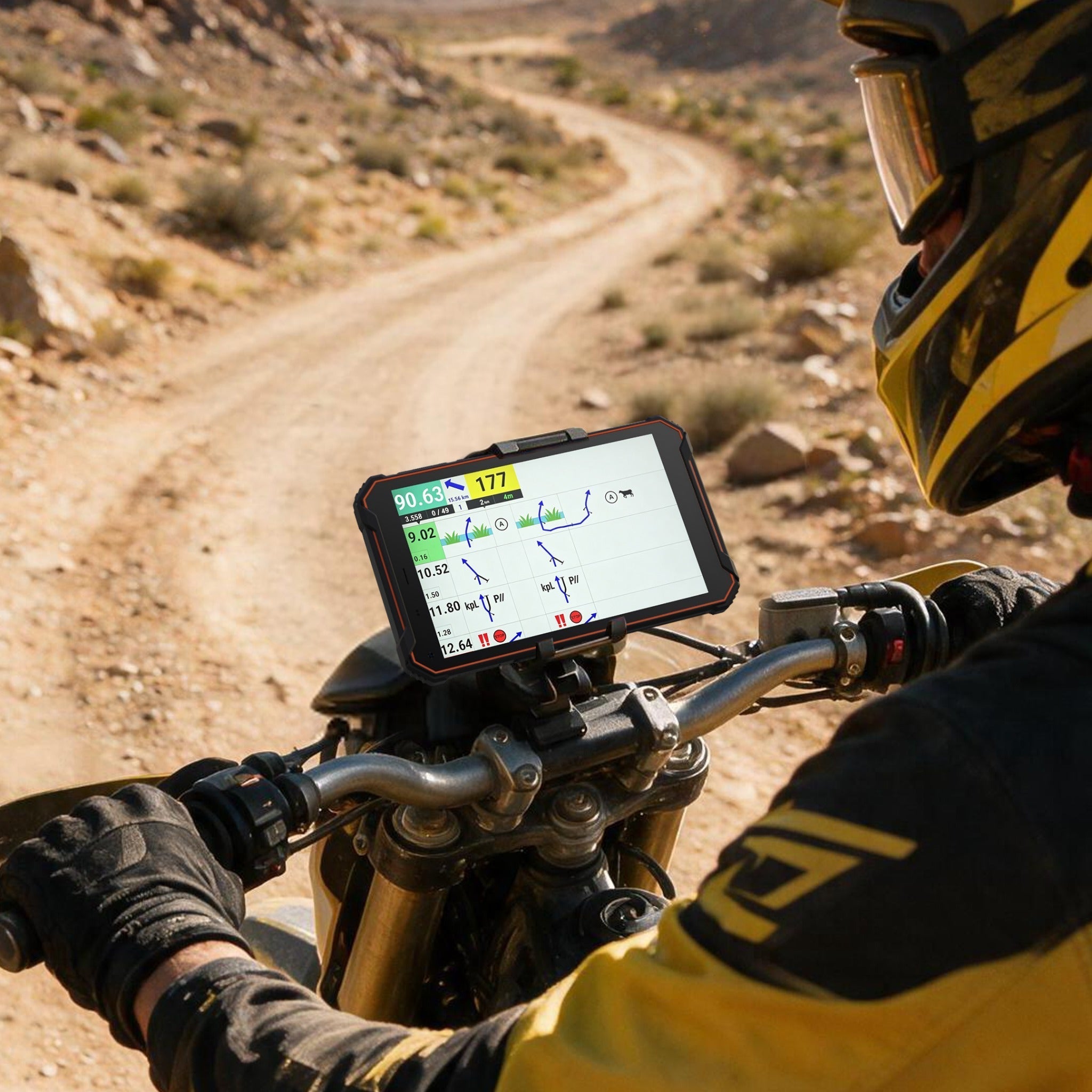
A reliable digital roadbook navigation setup is a verified chain of approved software, correct route files, usable positioning, secure mounting, sufficient power and a practiced backup. Choose the event and software requirements before the tablet. A rugged Android device such as Phonemax N1 may fit training, overland or permitted rally use, but hardware specifications alone do not establish competition approval.
Key conclusions
- Start with the organizer's current rules; some FIM events permit only organizer-provided digital screens.
- Validate the exact app, file and offline workflow before selecting or mounting a device.
- Treat mount, power and cable routing as safety-critical installation tasks.
- Test under route-representative brightness, temperature, vibration and connectivity conditions.
- Keep an independent backup; one electronic device should not carry every navigation and communication function.
What is a digital roadbook navigation setup?
A digital roadbook navigation setup is the complete system used to display and act on electronic route instructions. Depending on the event, a roadbook can identify the official itinerary, navigation points and principal hazards. For example, the FIM-approved 2026 Desafio Ruta 40 supplementary regulations require an electronic roadbook for the listed motorcycle and quad categories and state that no paper roadbook will be distributed. That event-specific rule should not be generalized to every rally. See the 2026 FIM-approved supplementary regulations.
The system is not merely a tablet. It includes the governing rule, roadbook application, correct stage file, device, positioning input, mount, controls where permitted, power, rider workflow and backup plan.
Step 1: Confirm the rules before choosing hardware
Input: The current event sporting and supplementary
regulations.
Action: Identify permitted screens, organizer-provided
equipment, communications restrictions, required mounting and approval
processes.
Result: A written list of what may and may not be
installed.
This step can reverse the entire purchase decision. The 2025 FIM World Rally-Raid Championship regulations stated that only digital screens provided by the organization were allowed on motorcycles unless prior authorization was obtained. The current event's rules, not a generic equipment guide, control competition use. Source: FIM World Rally-Raid Championship regulations.
For training, recreational overland travel or events that allow rider-supplied equipment, proceed to software and hardware validation.
Step 2: Validate the roadbook software and files
Input: Exact app name/version, device OS,
representative route file and licensing details.
Action: Install the app, import a non-sensitive
representative file, open every required view, test offline access and
verify any permitted external controls.
Result: A repeatable workflow that works without
last-minute setup.
Record the app version, Android version, file version and test date. “Runs on Android” is too broad to prove compatibility. Permissions, storage access, display behavior and peripheral support can change between versions.
Step 3: Check positioning without overstating it
Input: Device GNSS specification and a
route-representative location.
Action: Confirm that the app receives position data,
then observe acquisition and continuity in conditions similar to
use.
Result: Evidence that the selected app and device work
together in the tested conditions.
Phonemax N1 lists GPS, GLONASS and Galileo. GPS.gov defines GNSS as constellations that provide positioning, navigation and timing services, and the Galileo Open Service supplies global ranging, positioning and timing information to compatible receivers. Multiple system names do not guarantee a measured accuracy level for a specific tablet. Sources: GPS.gov and the European GNSS Service Centre.
Step 4: Engineer the mount around safe operation
Input: Device dimensions and mass, motorcycle
cockpit layout, mount specification and control clearances.
Action: Verify retention, viewing angle, steering
movement, cable routing and access to permitted controls. Inspect
fasteners after a representative shakedown.
Result: A device that remains secure and does not
obstruct steering, instruments or safe rider movement.
This article cannot confirm a mount because the reviewed N1 record does not list an included or approved mounting system. Use written compatibility information and a physical inspection.
Step 5: Build a measured power plan
Input: Expected operating time, display setting,
active radios, application load, ambient conditions and vehicle
supply.
Action: Fully charge the device, run the complete
workflow for a representative duration and record remaining capacity.
Repeat after software or display-setting changes.
Result: A route-specific runtime estimate plus a
compatible external-power plan.
N1 lists a 12,000mAh battery, 18W charging and reverse charging. These specifications do not establish runtime. A truthful plan uses measured consumption from the intended configuration rather than a universal hours claim.
Step 6: Verify offline and failure behavior
Input: Downloaded route files, maps where permitted,
login state and backup materials.
Action: Disable cellular and Wi-Fi, restart the device
and complete the essential workflow. Then simulate loss of the primary
device and switch to the approved backup.
Result: Proof that the route does not depend
unknowingly on network access and that failure recovery is
understood.
Do not test with confidential or embargoed competition route data outside the organizer's rules. Use organizer-approved material and handling procedures.
Step 7: Freeze and document the configuration
Input: A working setup.
Action: Record app version, OS version, file version,
mount, cable, display settings, test date and known limitations. Avoid
nonessential changes immediately before use.
Result: A reproducible configuration that another team
member can inspect.

Where can Phonemax N1 fit?
N1 can be evaluated as the Android device within this chain. The official product record lists Android 16, 6GB RAM, 128GB storage, GPS/GLONASS/Galileo, a 12,000mAh battery, 18W charging and stated IP68/IP69K/MIL-STD-810H protection.
Those values make N1 relevant to the evaluation; they do not skip it. App support, strong-light readability, glove interaction, mount compatibility, vibration behavior, cellular bands and organizer approval were not verified for this guide.
Pre-route acceptance table
| Gate | Pass evidence | Stop condition |
|---|---|---|
| Rules | Written permission or organizer-provided requirement | Device/screen not permitted or approval unclear |
| App | Exact version completes representative workflow | Crash, unreadable interface or unsupported file/control |
| Files | Correct file opens offline and is version-checked | Missing, stale or network-dependent route data |
| Positioning | App receives stable usable data in tested conditions | Repeated loss or unexplained behavior |
| Mount | Secure after shakedown; controls unobstructed | Movement, interference or uncertain retention |
| Power | Representative test plus compatible backup supply | Runtime margin inadequate or cable unsafe |
| Backup | Team can switch using approved method | Single failure removes navigation and communication |
Limitations, risks and alternatives
This guide provides a validation method, not a competition approval or installation certificate. It does not replace current organizer rules, professional electrical work or rider safety judgment. Phonemax has not supplied hands-on N1 results for runtime, vibration, strong-light readability, glove control or specific apps in this article.
If rider-supplied screens are prohibited, use the organizer's equipment. If a phone already passes the complete recreational workflow and environment is controlled, a separate rugged tablet may add unnecessary complexity. If the route is remote, keep appropriate non-network-dependent backup resources.
Frequently asked questions
Can I use my own roadbook tablet in an FIM rally?
Not automatically. Some FIM competition rules restrict motorcycles to organizer-provided digital screens unless authorization is granted. Check the current championship and event supplementary regulations.
Can a digital roadbook work without cellular coverage?
It can only if the selected app, licensing state and required files support offline operation. Prove this by disabling connectivity, restarting the device and completing the essential workflow before departure.
Is a large battery enough for a full rally stage?
Capacity alone cannot answer that question. Measure the complete configuration at representative brightness, temperature, positioning and radio settings, then retain a safety margin and compatible power backup.
Does a rugged rating guarantee the mount will survive vibration?
No. Device enclosure claims and mount retention are separate. Validate the exact mount, fasteners, cockpit layout and cable routing with a controlled shakedown and inspection.
Next step
Copy the acceptance table above into your team's pre-route checklist. If Android 16 hardware remains appropriate after the rules and app checks, compare the confirmed Phonemax N1 specification with your installation requirements.
Trust and source record
- Author: Phonemax Editorial Team
- Technical reviewer: Assign a named rally-navigation or product specialist before publication
- Method: Rule-first workflow built from primary FIM regulations, primary GNSS service descriptions and the current N1 product record; no hands-on test performed
- Commercial relationship: Phonemax publishes this guide and sells N1
- Prepared: 2026-08-06
- Substantive update: Use the actual date when event examples, product data or process steps change
- Primary sources: FIM W2RC 2025 regulations; FIM-approved 2026 event regulations; GPS.gov; European GNSS Service Centre; current Phonemax N1 product record


Hinterlasse einen Kommentar
Alle Kommentare werden vor der Veröffentlichung geprüft.
Diese Website ist durch hCaptcha geschützt und es gelten die allgemeinen Geschäftsbedingungen und Datenschutzbestimmungen von hCaptcha.