
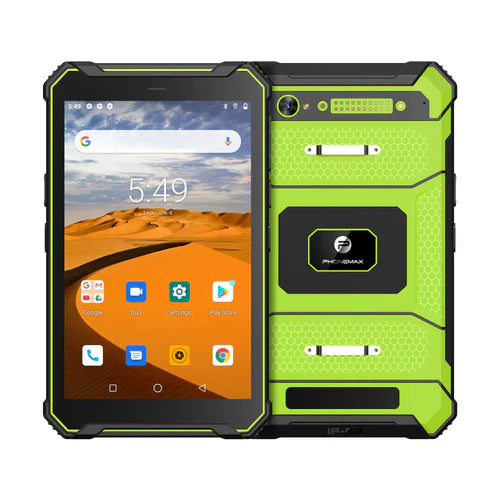
A rugged tablet used in a healthcare workflow should be selected as a complete deployment system, not by one specification such as battery capacity, screen resolution, Bluetooth version or drop height. The important questions are whether the exact device can support the intended workflow, cleaning procedure, software stack, connectivity, accessories, security policy and operating environment.
This guide is for procurement and deployment planning. A rugged commercial tablet is not automatically a certified medical device, and terms such as “medical tablet,” “antimicrobial,” “surgical,” or a stated drop height should not be treated as proof of suitability for a regulated clinical application. Verify the exact product documentation and the requirements that apply to your organization and use case.
Start with the healthcare workflow
Different workflows create different device requirements. A tablet used for bedside documentation may prioritize screen readability, touch accuracy, Wi-Fi roaming and frequent cleaning. A home-care team may prioritize battery runtime, cellular connectivity and portability. Ambulance or mobile-response work can add mounting, vibration, charging and environmental exposure. Pharmacy, inventory and equipment-management tasks may depend more heavily on barcode, NFC, camera or Bluetooth peripherals.
Before comparing hardware, document the applications, shift length, cleaning frequency, carrying method, charging opportunities, network environment and accessories the device must support.
Display: what does 1920×1200 actually tell you?
A 1920×1200 display provides a useful amount of screen detail for many tablet workflows, but resolution alone does not determine whether a screen is suitable for healthcare use. Evaluate brightness, contrast, viewing angle, touch behavior, font scaling, application layout and readability under the lighting conditions where staff will work.
If detailed forms, images, maps or dashboards are important, compare the application on the physical device rather than assuming that a resolution number guarantees usability. For a broader discussion of this resolution class, see the 10-inch 1920×1200 rugged tablet guide.
Drop resistance: validate the test conditions
A claim such as “1.2 m drop resistance” is meaningful only together with its test conditions. Ask what surface was used, how many drops were performed, which orientations were tested, whether accessories were installed and whether the quoted result applies to the exact production configuration.
Healthcare mobility can expose devices to carts, bedside use, hallways, vehicles and repeated handoffs. A practical evaluation should consider not only the headline drop height but also grip, weight, hand straps, protective corners, connector protection and how easily the device can be carried safely during routine work.
Cleaning, disinfectants and antimicrobial claims
Frequent cleaning can be a major requirement in healthcare environments. Confirm which cleaning agents, concentrations, contact times and procedures are compatible with the exact enclosure, display coating, seals, ports and accessories. An IP rating addresses ingress protection; it does not by itself establish compatibility with every disinfectant or chemical.
Likewise, an antibacterial or antimicrobial coating should not be treated as a substitute for an approved cleaning process. If such a coating is important to procurement, request specific documentation describing the material, test method, scope of the claim, durability of the treatment and limitations. Avoid assuming that a generic “antimicrobial” marketing term makes a device suitable for a surgical or other controlled clinical environment.
Glove-friendly touch and interaction
Glove use can change touch accuracy and gesture behavior. If staff will operate the tablet while wearing gloves, test the exact glove type, screen protector, application controls and touch settings. Large buttons, appropriate spacing and a workflow that minimizes precision gestures can matter as much as the touch-panel specification.
Also check whether physical buttons, a stylus, programmable keys or barcode triggers are needed when touch input is inconvenient.
Connectivity: Wi-Fi, cellular and Bluetooth
Connectivity should be evaluated against the real network and peripherals. A label such as Bluetooth 5.2 tells you the radio generation but does not guarantee compatibility with a specific scanner, printer, sensor or accessory. Pair and test the actual peripherals before fleet deployment.
For Wi-Fi, verify roaming behavior, authentication, coverage and application recovery while moving through the facility. For cellular use, confirm regional band support and the organization’s connectivity policy. If a workflow must continue during an outage, define an offline mode and synchronization process.
Battery runtime and charging strategy
Battery capacity in mAh is only one input to runtime. Display brightness, wireless signal quality, processor load, camera use, GNSS, peripherals, temperature and background services can all change operating time. A “10-hour” or all-shift target should be tested with the real applications and settings.
Plan the charging workflow at the same time as the device purchase: USB-C charging, docks, carts, vehicle power, spare devices and shift handover can determine whether a fleet stays available. See the rugged tablet battery-life buying guide for a broader runtime evaluation framework.
Software, privacy and device management
Confirm OS version, application compatibility, update policy, kiosk requirements, account management, encryption options and mobile-device-management support for the exact configuration. Organizations handling sensitive information should validate the complete device, application and network environment against their own security and compliance requirements.
Do not assume that rugged hardware automatically provides the software controls required by a healthcare organization.
Accessories and mounting
Accessories can materially change the usability of a tablet. Depending on the workflow, test hand straps, shoulder straps, charging docks, vehicle mounts, cart mounts, styluses, keyboards and scanning accessories. The mounted device should remain accessible, charge reliably and avoid blocking ports, antennas or cameras that the workflow needs.
What to verify before procurement
| Area | Verification question |
|---|---|
| Workflow | Which applications, tasks and shift conditions will the tablet support? |
| Display | Are resolution, brightness, scaling and touch behavior suitable in the real lighting environment? |
| Ruggedness | What exact drop, ingress and environmental test conditions apply to this SKU? |
| Cleaning | Which cleaning agents and procedures are approved for the materials and accessories? |
| Touch | Has the device been tested with the actual gloves, stylus or screen protector? |
| Connectivity | Do Wi-Fi, cellular, Bluetooth and peripherals work with the actual infrastructure? |
| Battery | Has runtime been measured under the representative application workload? |
| Security | Does the software lifecycle and device-management model meet organizational policy? |
| Accessories | Are charging, mounting and carrying accessories validated with the final configuration? |
| Compliance | Has the organization verified all requirements that apply to the intended healthcare use? |
Pilot-deployment checklist
- Choose a production-representative device rather than relying only on a specification sheet.
- Install the actual healthcare or enterprise applications.
- Test Wi-Fi roaming, cellular connectivity and required peripherals.
- Run a representative shift and record battery use, charging opportunities and thermal behavior.
- Perform the approved cleaning procedure repeatedly and inspect the enclosure, seals and screen.
- Test carrying, docking, mounting and glove interaction with real accessories.
- Document failures, recovery steps and support requirements before scaling the fleet.
FAQ
Does 1920×1200 make a tablet suitable for medical work?
No. Resolution can support detailed interfaces, but suitability also depends on brightness, touch behavior, software, cleaning, connectivity, security and the intended workflow.
Does a 1.2 m drop rating guarantee survival from every 1.2 m fall?
No. Drop results depend on the test method, surface, orientation, number of drops and device configuration. Review the documented conditions for the exact model.
Is an antimicrobial coating enough for infection-control requirements?
No. A coating is not a replacement for the cleaning and disinfection procedure required by the organization. Verify both the coating claim and material compatibility with the approved cleaning process.
Does Bluetooth 5.2 guarantee accessory compatibility?
No. Radio-version compatibility is only one factor. Test the exact peripheral, application and operating system together.
Is a rugged tablet automatically a medical device?
No. “Rugged” describes durability-related characteristics. The organization must verify the classification, documentation and requirements that apply to the intended healthcare use.
Bottom line
A useful rugged medical-tablet evaluation combines display quality, validated ruggedness, cleaning compatibility, glove interaction, connectivity, battery strategy, security, accessories and deployment testing. Treat each specification as evidence to verify—not as a substitute for a real pilot in the intended workflow.

Browse current rugged-device options or contact Phonemax to discuss a deployment requirement.
Editorial note: This article is a procurement and deployment guide, not medical advice or a certification statement. Product specifications, test results, cleaning compatibility and regulatory status can vary by model, market and configuration. Verify the current documentation for the exact device before procurement or clinical deployment.

השארת תגובה
כל התגובות מבוקרות לפני פרסומן.
This site is protected by hCaptcha and the hCaptcha Privacy Policy and Terms of Service apply.