
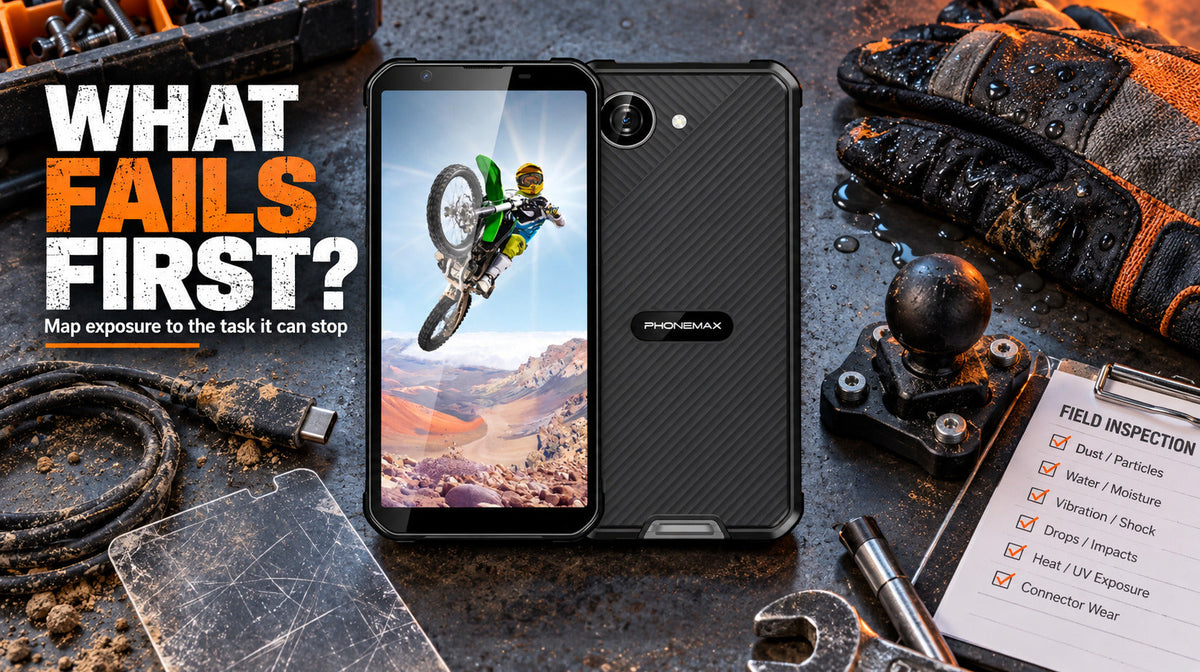
There is no universal smartphone part that always fails first in harsh work. The likely weak point depends on the exposure: impact threatens glass and edges; dust and liquid threaten openings and seals; vibration can affect mounts and camera systems; temperature and heavy workloads reduce usable battery reserve. The useful diagnosis is the failure that would stop your task.
Failure-mode matrix
| Exposure | Likely vulnerability | Task interruption | Pre-deployment check |
|---|---|---|---|
| Drops and edge impacts | Display, touch layer, camera glass, frame | Apps, scanning, navigation and photo records | Case/edge protection, grip and role-specific handling test |
| Dust, mud and debris | USB port, speaker, microphone, buttons | Charging, calls, PTT and physical input | Connector inspection and audio test in the real environment |
| Water or repeated wet handling | Enclosure seals, port covers, acoustic openings | Device availability and charging | Verify the exact IP claim, test conditions and warranty limits |
| Continuous vibration | Mount, connectors and vibration-sensitive camera components | Navigation and usable image focus | Use the intended mount and route; inspect images and connections afterward |
| Heat, cold and heavy load | Battery reserve and charging behaviour | Ability to finish a shift | Measure start/end percentage under representative conditions |
| Repeated operation with gloves | Touch accuracy and small controls | Slow or failed inputs | Test the required workflow with the actual gloves |
Diagnose by the task that stops
The screen turns on but the job cannot be completed
Cracks, edge damage, false touch inputs or poor visibility can make a technically powered-on phone operationally unusable. For scanning, navigation and forms, define a pass condition around the task rather than appearance.
The phone works but cannot recover power
USB-C does not need catastrophic damage to interrupt charging. Google’s Pixel support documentation notes that USB-C use can be disabled when liquid or debris is detected and instructs users to inspect the port and cable rather than insert objects into the connector. Follow the actual manufacturer guidance for the device being used.
Calls connect but communication fails
Dust, moisture, carry position and environmental noise can reduce the usefulness of speakers and microphones. Test calls and alerts at the noisiest normal work point, not only in an office.
The camera opens but the evidence is unusable
A scratched lens cover, impact or vibration-related focus problem may still allow the camera app to open while making serial numbers, QR codes or inspection photos unreadable. Review the output at the distance and lighting the job requires.
The enclosure claim no longer describes the device condition
IEC 60529 defines IP enclosure-protection classifications under specified tests. Real phones can later experience worn covers, contamination, impact or repair. Do not assume a damaged or incorrectly reassembled device retains the same protection as a new test sample.
Separate impact, ingress and vibration evidence
A drop reference does not automatically prove vibration suitability, and an IP rating does not describe every impact or chemical exposure. Keep each claim tied to its test. For more detail, read How Much Should Buyers Trust “Waterproof” Claims on Rugged Phones? and How a Rugged Smartphone Handles Continuous Vibration in Industrial Settings.
A pre-shift inspection
- Check screen and camera glass for cracks, lifting or severe abrasion.
- Inspect the charging port and cover without inserting tools.
- Place a real call and record a short voice note.
- Open the camera and confirm a label or QR code is sharply readable.
- Test power, volume and any programmable key.
- Confirm expected battery reserve and the planned charging point.
- Record any damage before assigning the device.
Use downtime data to change the equipment decision
Record the exposure, failed component, interrupted task, device condition, repair action and hours lost. Over time, this reveals whether the better intervention is a screen protector, sealed charging process, improved mount, spare device, different phone or user training.
The construction-site downtime guide explains why hardware protection is only one part of operational continuity.
First-party product context: Phonemax X5
The current Phonemax X5 listing shows a 238g compact rugged phone with Android 16 and a 5000mAh battery. It is included as an example of a product designed around compact rugged use, not as independent proof that it prevents every failure above.
What this guide cannot establish
- A population-wide ranking of smartphone failure frequency.
- A guarantee that one rugged model survives every listed exposure.
- Retention of ingress protection after damage or repair.
- A vibration certification inferred from a drop or IP claim.
- A fixed battery runtime inferred from capacity.
Connect inspection findings to maintenance
| Finding | Action to evaluate |
|---|---|
| Cracked glass or enclosure | Assess safe use and arrange service |
| Wet or contaminated port | Follow the exact device cleaning and drying instructions |
| Unclear audio | Test the approved call path and accessory |
| Loose mount | Stop relying on the mount until corrected |
| Heat, swelling or instability | Stop use and follow site/device safety procedures |
| Insufficient battery reserve | Use an approved fallback and measure the charging gap |
FAQ
What smartphone part usually fails first on a construction site?
No universal ranking applies to every phone and site. Identify whether impact, dust, water, vibration, temperature or charging creates the dominant recurring failure.
Can dust damage a phone that is never dropped?
Depending on device design and exposure, debris can interfere with ports, covers, speakers, microphones or buttons.
Does an IP rating mean the phone remains waterproof after repair?
No. The rating describes a tested enclosure and conditions; damage, wear or reassembly can change real protection.
Evidence note
This diagnostic matrix maps plausible failure modes to work interruptions; it is not a repair-frequency dataset. Product details come from the current Phonemax X5 listing. External technical sources support only the general connector, power and ingress principles cited.

Leave a comment
All comments are moderated before being published.
This site is protected by hCaptcha and the hCaptcha Privacy Policy and Terms of Service apply.