
Price update — October 9, 2026: Prices in this guide were rechecked in USD against the listed product configurations. Prices and availability may change; confirm the selected configuration on its product page before ordering.
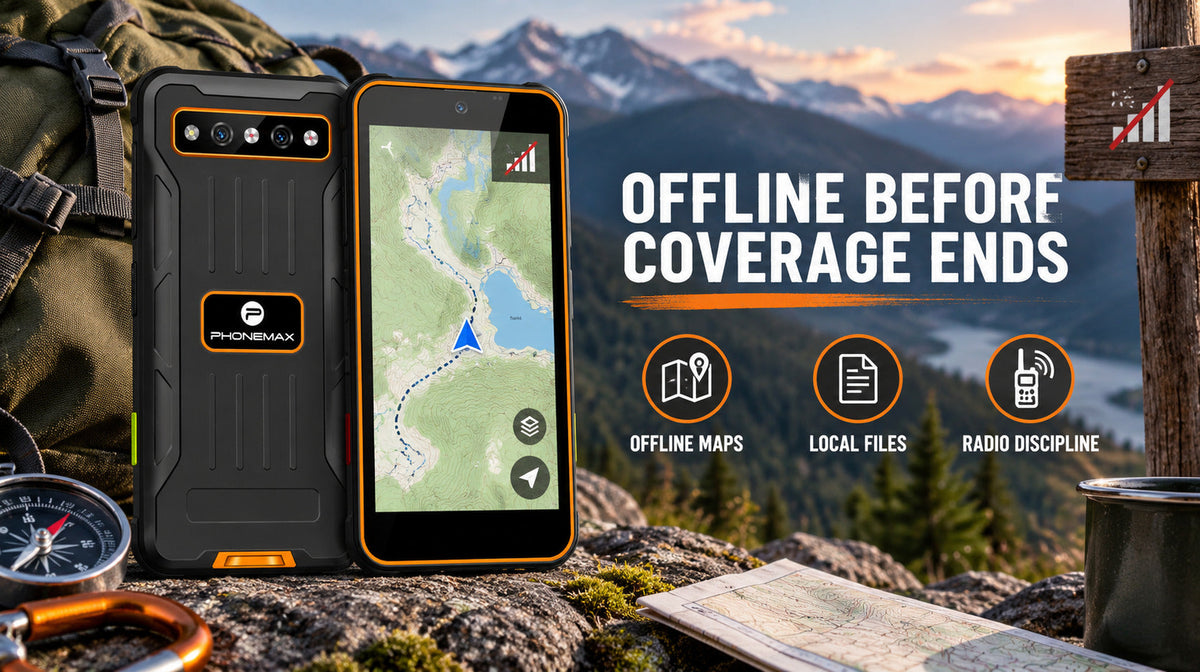
Do the work before you lose signal. A compact Android 14 rugged phone like the Phonemax R4 Mini can still handle selected offline tasks in areas with no coverage — provided the maps, files and applications were prepared beforehand. Download maps, cache your documents, switch off the background processes that will hunt for a tower and drain your battery, and agree a check-in protocol with someone who will notice if you miss it. Everything below is a variation on that single principle.
Last reviewed: 5 September 2026.
Key facts: what works without a signal
| Capability | Works offline? | Preparation required |
|---|---|---|
| Satellite positioning (your location) | Yes | None — positioning does not need a mobile network |
| Map display | No, unless cached | Download the area before departure |
| Camera and local photo storage | Yes | Ensure free storage |
| Notes, checklists, local files | Yes | Store locally, not cloud-only |
| Calls and SMS | No | Requires network coverage |
| Cloud sync, email, messaging | No | Queue and sync on return to coverage |
| Emergency calling | Sometimes | May connect via any available network; never rely on it as a plan |
The R4 Mini is a compact Android 14 rugged smartphone measuring 121 x 59.5 x 15.5 mm and weighing 150 g, listed at $138. Current product materials also state a 3000 mAh battery, OTG reverse charging, a 20MP night-vision camera and IP68/IP69K protection. It is sold in separate published network-band versions for Europe/Asia and the Americas. At the time of writing the US/Americas version is out of stock; the EU/Asia version is available. Verify its published bands against your carrier before ordering.
Why offline preparation matters
When the bars disappear, locally available functions can continue while network-dependent content and communication stop. Preparing maps, files and application access in advance separates the tasks that remain usable from those that require coverage.
There is a second, subtler failure: a phone in a no-coverage area does not sit quietly. It searches. Radio scanning at full power, repeatedly, is one of the fastest ways to flatten a battery — and it happens precisely when you can least afford it. A phone that would last a full day in town can lose its charge in a fraction of that time in a dead zone, purely from hunting for a tower that is not there.
So the offline workflow has two halves: make the content available locally, and stop the radio wasting energy on a network that does not exist.
Before you leave coverage: the preparation checklist
Download map coverage for the whole area, plus a margin. Not the route — the area. Routes change, and the margin is what saves you when they do. Verify the download completed by switching to flight mode and confirming the map still renders.
Cache every document you might need. Work orders, site plans, contact numbers, permits, reference photos. If it lives in a cloud folder, mark it for offline availability explicitly. "It was in my email" is not a plan.
Write down the critical phone numbers somewhere that is not the phone. Paper in a pocket. This costs nothing and covers the case where the device itself fails.
Screenshot anything that must not be lost. A screenshot is a local image file. It survives app logouts, session expiry and sync failures.
Tell someone your plan and your expected return time. A defined check-in and escalation plan gives another person a clear time to act if you do not return. Follow the safety procedure appropriate to the route, employer and jurisdiction.
Charge to full, and carry a means of recharging. Assume you will use more power than a normal day, not less.
In the dead zone: the radio discipline
In a genuine dead zone, flight mode can reduce repeated network searching; positioning can then be re-enabled where the Android build permits it.
Flight mode stops the modem searching for a network. Satellite positioning does not require a mobile network — it receives signals from satellites directly — so location and any cached map continue to work normally. On most Android builds you can enable location services while flight mode is active, which gives you the useful half of the phone without the expensive half.
If you need to remain reachable in marginal coverage, the alternative discipline is to check for signal periodically rather than continuously: leave the phone in flight mode, and take it out of flight mode for a few minutes at fixed intervals or at known high points. This converts continuous drain into occasional drain.
Additional measures that matter more offline than on:
- Reduce screen brightness. The display is typically the largest single consumer of power.
- Kill background sync. Apps that retry uploads in a loop are burning power for nothing.
- Keep the phone warm in cold conditions. Battery capacity drops in cold weather; an inside pocket meaningfully extends runtime.
- Do not stream, and do not let anything auto-update. Both will resume the instant a weak signal appears, at the worst moment.
Capture now, sync later
Work on the assumption that everything you produce offline is a local file waiting to be transmitted.
Photograph what you would normally upload. Write notes in a local notes app rather than a cloud-first tool. Record voice memos when typing is impractical — with gloves, in rain, or when you need to keep moving. Timestamp things manually if the record matters, since the photo metadata is only as good as the device clock.
Then, on return to coverage, sync deliberately rather than automatically. Walking back into a signal with forty queued uploads over a weak connection is a good way to fail all forty. Connect, check you have a stable connection, and upload in order of importance.
Where the R4 Mini's size helps, and where it does not
At 121 x 59.5 x 15.5 mm and 150 g, the R4 Mini is among the smallest rugged Android phones available. Offline, that cuts both ways.
It can help because a compact phone is easier to keep on your person. Screen power use still depends on brightness, active time and content, so do not infer runtime from display size alone.
It does not help with map reading. A compact display shows less context, which matters when you are navigating rather than following. If detailed map work is central to the trip, a small phone is the wrong primary navigation tool — see the alternatives below.
Compact rugged phones have a small but genuine following among users who deliberately carry less. Independent discussion is limited, but there is a user review thread on r/digitalminimalism and a follow-up usage post from the same community, plus a three-way comparison video covering the R4 GT, R4 Mini and Q9 Mini. These are user opinion rather than testing, but for this specific class of device there is little else independent available.
When a different device suits the trip better
If navigation is the primary task, a compact phone is the wrong tool. The Phonemax N1 at $509 is a rugged Android 16 rally navigation tablet with GPS, GLONASS and Galileo positioning, a 12,000 mAh battery and IP68/IP69K protection — built for digital roadbooks, overland travel and off-road route guidance. The battery capacity alone changes what a multi-day trip looks like.
If you need to see in the dark, the Phonemax X3 at $155 adds a night-vision camera that captures monochrome images in very low light, plus L1+L5 dual-band positioning which can improve positioning stability in difficult terrain and around obstructions.
If thermal detection matters — locating animals, people or heat sources rather than simply seeing — the Phonemax R4 GT at $298 adds thermal imaging and night vision in a similar compact body at 121 x 59.2 x 18.3 mm and 190 g.
If battery endurance is the binding constraint, the Phonemax P2 at $191 carries a 6100 mAh battery with 8GB RAM and 128GB storage and IP68/IP69K protection — a larger device, but one that changes the recharging calculus on long trips.
Browse the Mini Phones and Rugged Phones collections to compare footprints.
Limitations and what to know
- No phone is a satellite communicator. Positioning is receive-only. Being able to see your coordinates does not mean anyone else can see them, and it does not let you call for help. If your work involves genuine isolation, carry a satellite messenger or personal locator beacon. This article does not substitute for one.
- Emergency calling behaviour varies. In some regions a phone can place an emergency call over any available network. This depends on country, carrier and local infrastructure, and must never be assumed as a safety plan.
- Battery capacity is listed as 3000 mAh; runtime is not published. Capacity alone does not predict endurance. Test flight mode, offline maps, screen brightness and cold-weather use on your own unit before relying on it for a long trip.
- Positioning accuracy varies with terrain. Dense canopy, canyons and tall structures degrade satellite reception on any device.
- Cold weather reduces battery performance on all lithium batteries. Plan for less runtime in winter.
- Regional availability affects planning. The US/Americas version is currently out of stock; verify availability before building a trip around a specific model.
- Offline app behaviour differs by app. Some tools become unusable without a connection even for locally stored data. Test yours in flight mode before departure, not on the trail.
FAQ
Does GPS work without a mobile signal on the R4 Mini? Satellite positioning does not require a mobile network. However, most map applications download map imagery over the network, so you must cache map data in advance for the map itself to display.
Should I use flight mode in a no-coverage area? Generally yes. It prevents the modem from continuously searching for a network, which is a significant drain. Most Android builds let you enable location services while flight mode is active.
How do I know whether my documents are actually available offline? Switch to flight mode before you leave and open each one. Anything that fails to load was never cached. This two-minute check prevents most offline document problems.
Will queued photos and messages send automatically when I return to coverage? Usually, but a weak returning signal can cause repeated failed attempts. Sync deliberately once you have a stable connection, prioritising what matters.
Is the R4 Mini suitable as a remote-work phone? It suits users who want a small, light, rugged Android phone they will genuinely always carry. It is not suitable as a primary navigation device for detailed map work, and it is not a satellite communicator.
What is the difference between the R4 Mini and the R4 GT? Both current product materials describe a 20MP night-vision camera. The R4 GT adds a 256 × 192 thermal camera and uses a larger 190 g body; the R4 Mini is the lighter 150 g option without thermal imaging.
Evidence and disclosure
Phonemax publishes this commercial guide and sells the devices mentioned. Product specifications and availability were checked on 5 September 2026; the cited community posts and video are independent opinions, not controlled testing. The offline steps are general Android practices rather than unique R4 Mini capabilities, and no runtime benchmark is claimed. For genuinely isolated travel or work, use appropriate emergency-communication equipment: the R4 Mini is not a satellite communicator.
Sources and references
- Phonemax R4 Mini product page — manufacturer specifications
- Reddit r/digitalminimalism, R4 Mini owner review (independent user content)
- Reddit r/digitalminimalism, follow-up usage report (independent user content)
- R4 GT vs R4 Mini vs Q9 Mini comparison (independent video)
- smartphone.ma R4 Mini specification entry (independent aggregator)
Evidence boundaries: device specifications and stock status are first-party manufacturer data read on 2 September 2026. The Reddit threads and video are independent but constitute user opinion rather than controlled testing; no laboratory or field testing of this model's offline endurance exists in any source cited. The offline workflow guidance is general Android practice and has not been benchmarked on this device.
Related guides
- Phonemax Q9 Mini vs R4 Mini: Which Small Android Phone Fits You?
- Phonemax N1 GPS Battery Drain: How to Plan an All-Day Navigation Test
- When GPS Is Not Enough: A Rally Navigation Backup Plan for Phonemax N1 Users

Laisser un commentaire
Tous les commentaires sont modérés avant d'être publiés.
Ce site est protégé par hCaptcha, et la Politique de confidentialité et les Conditions de service de hCaptcha s’appliquent.