
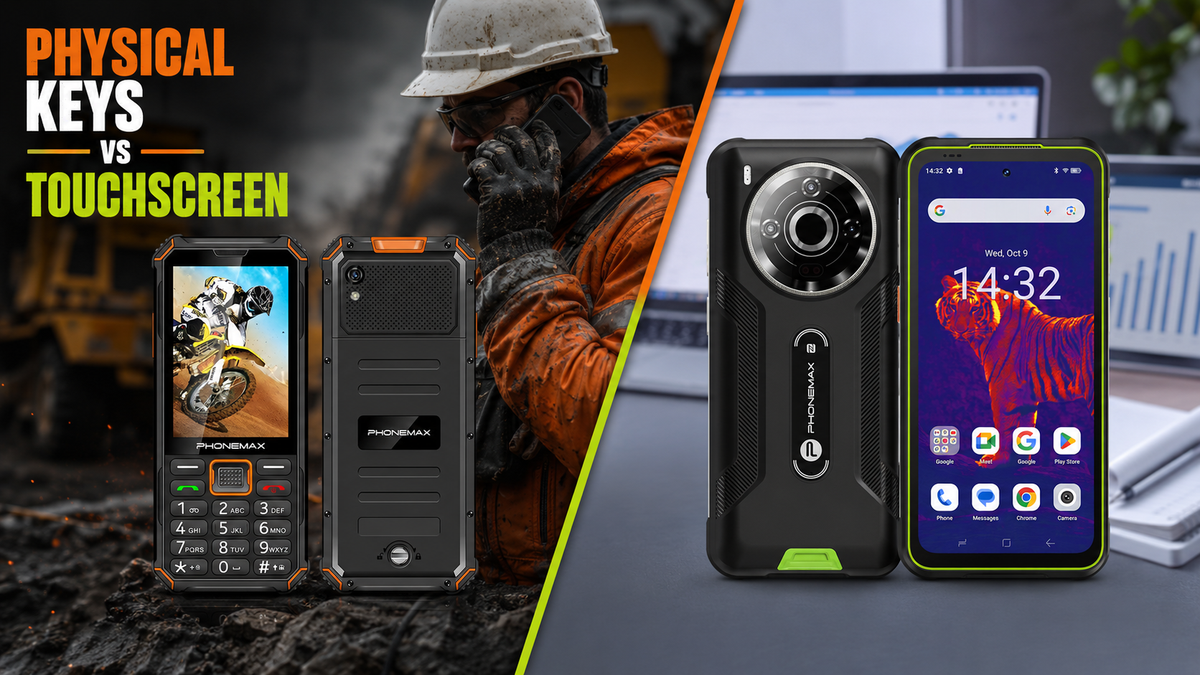
Physical keys can make more sense than a full touchscreen when the job is dominated by repeatable communication tasks rather than continuous app interaction. The decision is not about whether buttons are “better” technology. It is about whether the input method matches the worker's most common actions.
Start with the top five actions
List what the worker does most often: answer calls, dial known contacts, read short messages, use a communication app, confirm a task, take a simple photo or open a small number of Android applications. If most of the shift consists of a few repeated actions, dedicated physical controls can reduce the amount of screen navigation required.
The Phonemax F3 T is a hybrid Android-based feature phone with physical keys and a touchscreen. The Phonemax F4 T follows the same hybrid idea with larger physical controls. These devices are better evaluated as workflow tools than as miniature versions of a conventional smartphone.
Where physical keys can help
Buttons provide a fixed control surface. That can be useful when workers repeatedly answer or end calls, navigate a simple interface or operate the phone without dedicating the entire front surface to touch input. A hybrid design also retains touch for apps that are difficult to use with buttons alone.
However, physical keys do not guarantee usability with every glove, environment or accessibility need. Button size, spacing, required force and the software's response all need to be tested by the actual users.
Where a full touchscreen remains stronger
A conventional smartphone interface is usually better when the work requires extensive text entry, spreadsheets, complex forms, image annotation, multi-window workflows or applications designed around large touch targets. Trying to force those tasks onto a small hybrid feature phone can create more friction than it removes.
A practical decision table
| Workflow | Likely fit | Reason to test |
|---|---|---|
| Frequent voice calls and short messaging | Physical keys + touch | Repeated call controls may be easier to locate consistently. |
| Long form entry and document editing | Full touchscreen | Larger virtual keyboards and app layouts usually matter more. |
| Simple communication apps plus traditional dialing | Hybrid phone | Touch supports apps while keys preserve familiar phone operation. |
| Map-heavy or visual inspection workflow | Full touchscreen or tablet | Screen area becomes more important than keypad access. |
| Shared device with a narrow task set | Either, after pilot test | Training time and task consistency may matter more than form factor. |
Do not buy on speaker claims alone
Both the F3 T and F4 T product pages describe a high-volume 3W speaker and a rating of up to approximately 120dB under test conditions. That number should not be treated as a guarantee that every call will be understandable in every workplace. Network quality, codec, background noise, speaker orientation and hearing protection can all affect practical intelligibility.
For a noisy work site, test recorded speech and live calls in the actual acoustic environment. The useful question is not “how many decibels?” but “can the intended user understand the message at the required distance and with the required protective equipment?”
Hybrid Android feature phones also need app validation
Because F3 T and F4 T are Android-based hybrid devices, app availability should be checked individually. Confirm that the required app installs, logs in, displays correctly on the screen, receives notifications and remains usable with the available memory and network configuration.
A procurement pilot should include the exact app version and region. Do not assume that Android support means every smartphone application will provide the same experience as it does on a large touchscreen phone.
Five checks before deployment
- Have representative workers complete the top tasks without coaching.
- Test calls and alerts in the real noise environment.
- Validate every required Android app and login flow.
- Check physical-key operation with the actual gloves or protective equipment used.
- Measure task time and error rate against the current device rather than relying on preference alone.
FAQ
Are physical keys always easier with gloves?
No. Glove thickness, button size, spacing and required force vary. Test the exact combination used at work.
Can an Android feature phone run the same apps as a normal smartphone?
Some compatible Android apps may run, but availability, layout and performance can differ. Validate each required app before deployment.
Should a company replace smartphones with keypad phones?
Only when the workload supports it. A pilot should compare real task completion, communication quality and user error rates.
Sources
- Android Enterprise Recommended requirements — used as general enterprise-device evaluation context, not as a certification claim for these models.
Publisher disclosure: This article is published by Phonemax. The F3 T and F4 T descriptions used here—including their hybrid physical-key-plus-touchscreen design and Phonemax-listed 3W speaker rating of up to approximately 120dB under test conditions—are first-party product information from Phonemax. Google’s Android Enterprise Recommended requirements are cited only as independent enterprise-device evaluation context for deployment testing and app/workflow validation; they do not evaluate the F3 T or F4 T and do not certify, endorse or independently validate either model. The article’s recommendations about glove use, call intelligibility and task testing are presented as procurement test practices rather than third-party performance claims about these phones.


コメントを書く
全てのコメントは、掲載前にモデレートされます
このサイトはhCaptchaによって保護されており、hCaptchaプライバシーポリシーおよび利用規約が適用されます。