
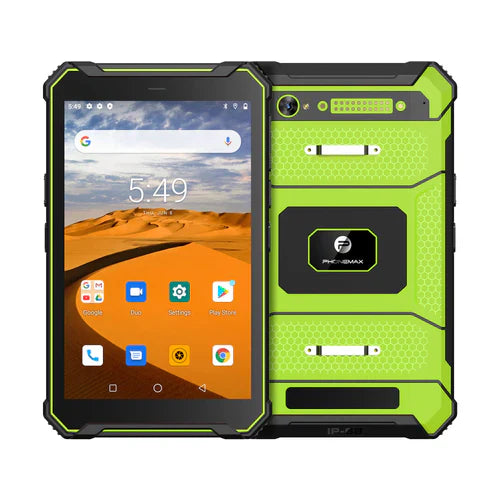
A rugged vehicle tablet has to do more than survive occasional handling. In a truck, motorcycle, off-road vehicle, warehouse vehicle or field-service fleet, the tablet may spend hours in a mount while exposed to vibration, sunlight, heat, dust, repeated charging and frequent touch input. Cover-glass strength matters, but it is only one part of the system.
This guide focuses on how to evaluate a vehicle-mounted rugged tablet, including display protection, Gorilla Glass claims, glare, touch operation, mounting, vibration, power, thermal conditions, GNSS and connectivity.
Start with the vehicle workflow
Define how the tablet will actually be used: navigation, digital roadbook, dispatch, fleet management, inspection, proof of delivery, equipment control or another task. Record expected screen-on time, orientation, mounting position, vehicle type, charging method, required apps and connectivity.
Cover glass is not the same as whole-device protection
Corning Gorilla Glass is a strengthened cover-glass family. Corning publishes version-specific laboratory information, such as for Gorilla Glass 3 and Gorilla Glass 5. Those material tests should not be interpreted as a complete vehicle-tablet durability rating.
For a mounted device, durability also depends on the display assembly, enclosure, frame, corners, mounting points and how vibration or impacts are transferred through the mount. If a specific Gorilla Glass generation is required, verify it against the exact production SKU or approved BOM.
Glare and sunlight readability
A vehicle display can be difficult to read even when the cover glass is durable. Windshields, side windows and changing sun angles create reflections that differ from normal indoor use. Evaluate panel brightness, reflectance, optical bonding, viewing angle and any anti-glare treatment as a system.
Test the device in the intended cab or outdoor mounting position. A specification sheet cannot fully reproduce real reflections, shadows and viewing angles.
Mounting and vibration
The mount is part of the reliability system. Check how the tablet is retained, whether controls and ports remain accessible, whether the mount blocks cooling areas, and how quickly a user can remove the device when needed.
For vehicles with continuous vibration or shock, request evidence for the complete mounted configuration where possible. A handheld drop test does not automatically demonstrate long-duration resistance to vibration in a vehicle.
Power and charging
Navigation and high-brightness display use can keep power demand high for long periods. Confirm the supported charging method, charger output, cable retention and whether the tablet can maintain or increase battery level during the intended workload.
Also consider ignition behavior and overnight storage. A permanently connected charger may not be appropriate for every vehicle electrical system. The deployment plan should define when power is supplied and how the tablet is shut down or removed.
Temperature inside vehicles
Vehicle interiors can become much hotter or colder than typical room conditions. Check the documented operating and storage ranges for the exact device. Direct sunlight on a mounted tablet can also raise local temperature while the screen, processor, cellular modem and charging system are active.
Do not assume an IP rating or rugged enclosure eliminates thermal limitations. Validate the workload under representative temperature and sunlight conditions.
Touch operation with gloves and rain
Drivers, riders and field workers may use gloves or operate a display with water on the surface. Verify glove mode, wet-touch behavior and stylus support with the exact accessories that will be used. A screen protector or anti-glare film can alter touch sensitivity, so test the final configuration rather than the bare sample alone.
GNSS, connectivity and antenna placement
For navigation, confirm the supported satellite-navigation systems and test positioning in the installed location. Vehicle bodywork, heated windshields, dashboards and other electronics can affect reception. For connected applications, also test cellular, Wi-Fi and Bluetooth performance in the real installation.
If the workflow depends on external sensors, headsets, barcode readers or vehicle interfaces, verify the full accessory chain before fleet deployment.
Vehicle-tablet procurement checklist
- Define the exact vehicle, mount and workflow.
- Verify the cover-glass specification if a specific Gorilla Glass generation is required.
- Test sunlight readability and reflections in the installed position.
- Validate the mount under expected vibration and shock.
- Confirm charging performance during the real navigation or work load.
- Review operating and storage temperature limits.
- Test gloves, wet touch, stylus and screen protectors.
- Verify GNSS and wireless performance after installation.
- Check cable routing, connector retention and service access.
- Run a pilot installation before approving a larger fleet.
OEM and ODM validation
For a custom vehicle-tablet project, freeze the approved display, cover glass, touch controller, mount interface and charging arrangement in the sample or BOM record. Ask how component substitutions are controlled. If the final product will be marketed with a named glass generation or a specific ruggedness claim, require evidence tied to the production configuration.
FAQ
Is Gorilla Glass enough for a motorcycle or truck tablet?
No. It can be part of a durable display design, but mounting, vibration, temperature, charging, enclosure design and the complete display assembly also matter.
Does a rugged tablet automatically remain readable in direct sun?
No. Readability depends on the full optical system, brightness, reflections and mounting angle. Test the installed device in representative conditions.
Should a vehicle tablet stay plugged in all the time?
That depends on the device, charger, vehicle electrical system and operating procedure. Validate charging behavior and define a deployment policy rather than assuming continuous power is always appropriate.
For a vehicle, navigation or fleet project, review current rugged-device options or contact Phonemax with your mounting, power and application requirements.


Zostaw komentarz
Wszystkie komentarze są moderowane przed opublikowaniem.
Ta strona jest chroniona przez hCaptcha i obowiązują na niej Polityka prywatności i Warunki korzystania z usługi serwisu hCaptcha.