
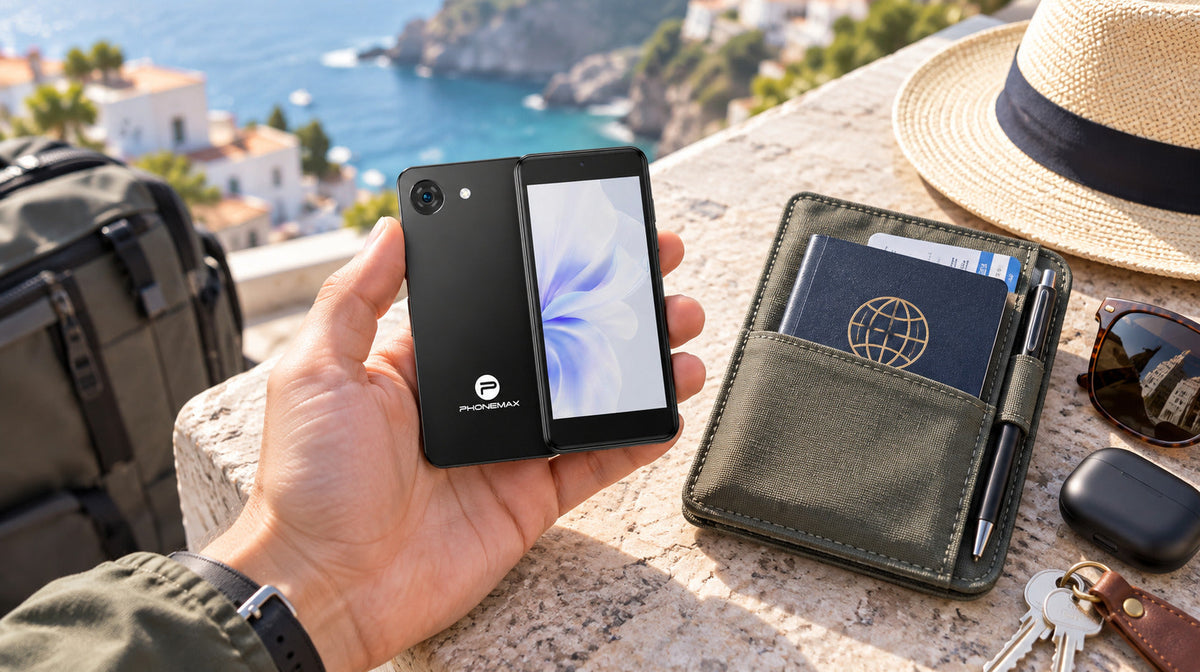
The Phonemax Q9 Mini suits buyers who want a lightweight second phone for calls, messages and short app interactions. At 109g and 114 × 53.3 × 12.4mm, it is built around minimum carry size. The trade-off is equally clear: a 4-inch display and a 2000mAh battery require more careful planning for long typing sessions, dense interfaces and power-heavy travel days.
It can take over specific jobs from a larger smartphone. Whether it can replace your main phone depends on the applications, screen time and network you rely on.
Q9 Mini specifications at a glance
| Specification | Published configuration |
|---|---|
| Display | 4-inch |
| Dimensions | 114 × 53.3 × 12.4mm |
| Weight | 109g |
| Operating system | Android 14 |
| Processor | Unisoc T606 |
| RAM and storage | 4GB + 64GB |
| Battery | 2000mAh |
| Network versions | Europe/Asia and US/Americas |
Specifications checked against the Phonemax product page on November 4, 2026. Confirm the selected regional configuration before ordering.
What 109g changes in daily carry
A second phone only helps if it is easy enough to keep with you. Q9 Mini takes up little space in a pocket, small bag or travel pouch. That makes it a practical format for a separate number, a travel companion or a backup kept with essential documents.
It remains a general Android device, but the compact screen should shape what you expect from it. The strongest reason to choose it is reducing the size and weight of the phone you carry for a defined set of tasks.
The 4-inch screen is the defining compromise
Calls, short messages, one-time codes, tickets and quick map checks suit a small display. Long emails, spreadsheets, detailed forms and extended route viewing are likely to feel more constrained.
On a 4-inch screen, the keyboard takes up a larger share of the available space. Applications designed around larger displays may feel crowded even when they install correctly.
If the phone’s job can be completed in short interactions, compactness is an advantage. If the job requires reading and entering information for several minutes at a time, a larger device is likely to be more comfortable.
Before deciding, try writing a normal message, opening a booking confirmation and reading a map instruction. The Q9 Mini one-handed usability guide provides a practical checklist.
Four roles that fit Q9 Mini
The following are suggested uses, rather than reported customer tests.
A separate work number
Keep work calls and short replies on a separate device while your main phone stays available for personal use. Before choosing this setup, check that the messaging or calling application you need works comfortably on the small screen.
A travel-document companion
Save hotel details, addresses and tickets before leaving. Open each document offline and check that any barcode remains readable at a usable size.
This setup is most useful when the documents are already stored locally. A second phone offers less protection against disruption if every file still requires access to your main phone or an online account.
An authentication device
Use a separate device for supported sign-in and verification applications. Configure account recovery before relying on it, and keep recovery codes somewhere secure outside the phone.
Application support and account requirements should be checked individually.
An emergency backup
Prepare essential contacts, a compatible SIM and a charging cable in advance. Make a test call and confirm that the phone is ready to use.
A backup phone is useful only when it is charged, accessible and configured.
Where the 2000mAh battery changes the plan
Battery capacity alone cannot establish how long the phone will last. Navigation, weak mobile signal, hotspot use, high brightness and video calling can increase consumption.
For occasional backup use, establish a regular charging routine. For travel, test your intended combination of maps, messaging and mobile data before relying on the phone for a full day.
Keep a suitable charging option available when the phone will handle essential communication.
Choose the correct regional version
Q9 Mini has separate Europe/Asia and US/Americas network versions. Select the version for the carrier you intend to use, then compare its published bands with the operator’s requirements.
The shipping country alone does not establish compatibility. Ask the carrier about device acceptance and voice-service requirements if calls are essential.
Q9 Mini or R4 Mini?
Choose according to handling conditions as well as size.
Q9 Mini prioritizes lightweight everyday carry. If your phone will regularly face rough handling or outdoor work, compare it with the compact rugged R4 Mini.
Read the Q9 Mini vs R4 Mini comparison before deciding. The purpose of that comparison is to help you choose between portability and rugged construction, rather than assuming every small phone serves the same role.
Frequently asked questions
Is Q9 Mini suitable as a primary phone?
It may suit someone whose routine centers on calls, messaging and light app use. Users who frequently type long documents, watch extended video or need a wide navigation view should consider a larger display.
Can Q9 Mini run everyday Android apps?
It runs Android 14, but compatibility depends on each application’s requirements, regional availability and device checks. Installation also does not guarantee that an application will be comfortable on a 4-inch screen.
Check your essential apps before committing to the phone.
How long does the 2000mAh battery last?
There is no single runtime that applies to every workload. Test the phone with your intended SIM, applications, brightness and navigation use. This article does not claim an independently measured endurance result.
Which Q9 Mini network version should I choose?
Choose the version whose published bands match your intended carrier. Confirm activation and voice support with the operator when necessary; a regional label alone is insufficient.
Check your configuration before ordering
Choose Q9 Mini when carrying less matters more than having a large screen. Start with your essential applications, intended carrier and charging plan.
View Q9 Mini configurations and current availability, then select the appropriate regional version before placing your order.
Product information and disclosure
Phonemax publishes this guide and sells the Q9 Mini. Product specifications and regional-version information were checked against the official product page on November 4, 2026.
The suggested scenarios are buying guidance, not customer case studies. No hands-on battery, application-performance or carrier-compatibility test is claimed.

Laisser un commentaire
Tous les commentaires sont modérés avant d'être publiés.
Ce site est protégé par hCaptcha, et la Politique de confidentialité et les Conditions de service de hCaptcha s’appliquent.