
Before rolling an update across work tablets, evaluate the exact proposed build on the tasks the team cannot afford to lose. Record the starting setup, the change and the observed result. A successful update installation is only the beginning of application acceptance.
Define the proposed change precisely
Identify whether the change is a device software update, a work-app release, a management setting or an accessory firmware update. Avoid changing several components together during the first evaluation. Otherwise it becomes harder to explain which change affected the task.
| Critical workflow | What to recheck on the proposed setup |
|---|---|
| Provisioning and sign-in | The correct account and organization environment open |
| Work forms and attachments | A complete test record reaches the intended system |
| Required accessory | The agreed input or connection task still works |
| Notifications | The correct worker receives and opens the relevant event |
| Interruption handling | The app follows its documented recovery process |
| Support handover | IT can identify failed devices and preserve work data |
Prepare recovery before rollout
Ask the responsible IT and software teams how pending work should be protected and what to do if an update causes a blocker. Confirm which recovery actions are actually supported. Do not promise that downgrading, resetting or restoring will always be available or will preserve every app's data.
Do not confuse sales versions with an update path
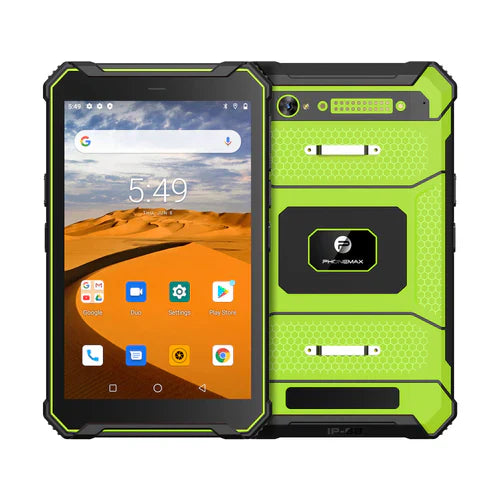
The T1 listing offers Gray with Android 16 and Green with Android 10. These are listed sales configurations; their coexistence does not confirm that one can be upgraded or converted into the other. Request support information for the exact supplied unit.
Ask Phonemax about the proposed build and device version, and ask your application provider to review the workload. No update schedule, support duration, upgrade entitlement or successful compatibility test is established here. The checklist is a suggested way to evaluate a specific change before wider deployment.
Related guide: Industrial Tablet Alerts: Verify Who Receives the Work Event.


コメントを書く
全てのコメントは、掲載前にモデレートされます
このサイトはhCaptchaによって保護されており、hCaptchaプライバシーポリシーおよび利用規約が適用されます。